Features
To Set Up to Connect HondaLink’ Service
In this manual: Features
~1min read
Use the following procedure to connect to HondaLink’ service.
To enable the HondaLink’ service
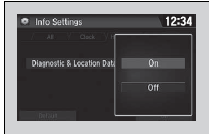
1. Select .
2. Select Settings.
3. Select Info.
4. Select the HondaLink tab.
5. Select Diagnostics & Location Data.
6. Select On.
1. Select .
2. Select Settings.
3. Select Info.
4. Select the HondaLink tab.
5. Select Diagnostics & Location Data.
6. Select On.
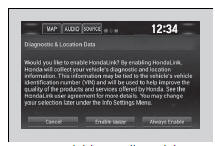
Enable once: Allows only one time. (Prompt shows again next time.) Always Enable: Allows anytime. (Prompt does not show again.) Cancel: Does not allow this consent.
* Not available on all models
To link with HondaLink’
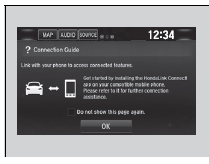
You can see the Connection Guide screen after launching HondaLink’. If you do not need this guide, select check-box and select OK.
Test yourself
A quick Honda Civic quiz: every answer comes with an explanation and a link to the manual page.
Was this page helpful?