Function Display and Control
Main Function
You can see the status of Smart Cruise Control operation in the driving assist mode on the cluster. See "LCD Display Modes" in chapter 4.
Smart Cruise Control will be displayed as shown below depending on the system status.
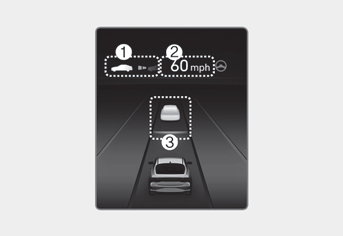
• During operation
(1) Whether a vehicle ahead is present and the selected distance level is displayed.
(2) The set speed is displayed.
(3) Whether a vehicle ahead is present and the distance to the target vehicle is displayed.
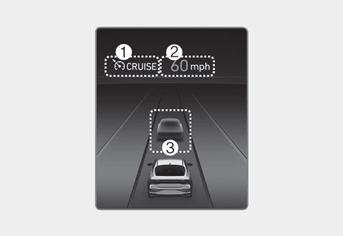
• During temporary cancellation
(1)  indicator is displayed.
(2) The previous set speed is grayed out.
(3) The vehicle ahead and the distance level are not displayed.
Information
- The distance to the vehicle ahead is displayed on the cluster according to the actual distance between your vehicle and the vehicle ahead.
- The target distance may vary depending on the vehicle speed and the set distance level. If the vehicle speed is low, even though the distance to the vehicle has changed, the change in the target distance between vehicles may be small.
For temporary acceleration
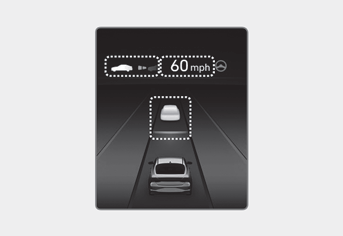
If you want to accelerate temporarily while Smart Cruise Control is on, press the accelerator pedal. While the speed is increasing, the set speed, distance level, and target distance will flash on the cluster.
WARNING
Be careful when accelerating temporarily, because the speed and distance are not controlled automatically even if there is a vehicle ahead.
Function temporarily canceled
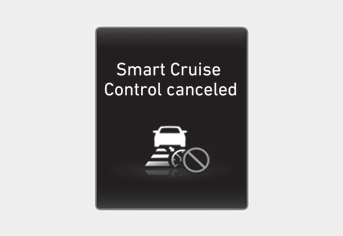
Smart Cruise Control will be temporarily canceled automatically when:
- Your vehicle speed is above 130 mph (210 km/h)
- The vehicle stops for a certain period of time
- The accelerator pedal is continuously depressed for a certain period of time
- Smart Cruise Control operating conditions are not satisfied
If the function is temporarily cancelled automatically, a cancellation warning will appear in the cluster for Smart Cruise Control and a warning chime will sound to alert the driver.
If Smart Cruise Control is temporarily cancelled while the vehicle is stopped with the system operating, the EPB (Electronic Parking Brake) may be applied.
WARNING
When the function is temporarily cancelled, the distance to the vehicle ahead will not be maintained. Always watch the road while driving and, if necessary, press the brake pedal to reduce vehicle speed and maintain a safe distance.
Functional conditions not met
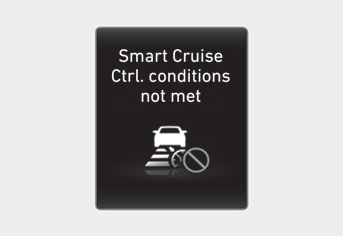
If the Driving Assist button, + or - switch is pressed or the switch is pressed when the system operating conditions are not met, "Smart Cruise Control Conditions Not Met" will appear in the cluster and a warning chime will sound.
In traffic situations
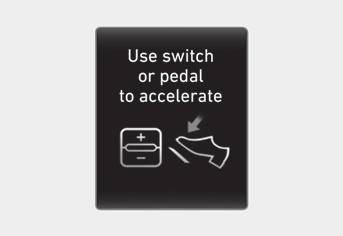
In heavy traffic, your vehicle will stop if the vehicle ahead of you stops. Also, if the vehicle ahead of you starts moving, your vehicle will also start moving. Furthermore, if the vehicle has stopped for a certain time, the message "Press Accelerator Pedal or Press + or - Switch to Start Moving" will appear in the cluster. Press the accelerator pedal or press the + or - switchto start moving.
WARNING
While the message is displayed in the cluster, if there is no vehicle ahead or the vehicle is far away, and the + or - switch is pressed the switch is pressed, Smart Cruise Control is automatically cancelled and the EPB will be applied. However, if the accelerator pedal is pressed, the EPB will not be applied, even if the system is cancelled. Always pay attention to the road conditions ahead.
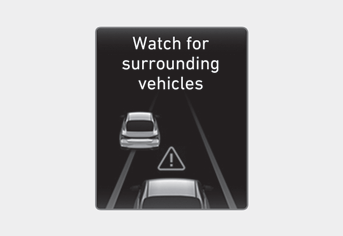
In the following situations, a warning message about surrounding vehicles will appear in the cluster and an audible warning will sound to alert the driver to road conditions ahead.
-- The vehicle ahead disappears while Smart Cruise Control maintains distance from the vehicle ahead when driving below a certain speed.
-- While the message "Press Accelerator Pedal or Press + or - Switch to Start Moving" is displayed in the cluster, if there is no vehicle ahead or the vehicle is far from you, and the + or - switchis pressed.
WARNING
Always watch for vehicles or objects that may suddenly appear ahead, and, if necessary, press the brake pedal to reduce vehicle speed and maintain a safe distance.
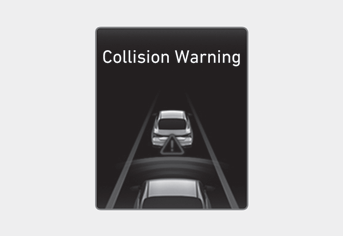
While Smart Cruise Control is operating, if there is a high risk of collision with the vehicle ahead, a Collision Warning message will appear in the cluster and a warning chime will sound to alert the driver. Always keep your eyes on the road while driving and, if necessary, press the brake pedal to reduce speed and maintain a safe distance.
WARNING
In the following situations, the Smart Cruise Control system may not warn the driver of a collision.
-- The distance to the vehicle ahead is short, or the speed of the vehicle ahead is faster than or similar to your vehicle
-- The speed of the vehicle ahead is very slow or it is stationary
-- The accelerator pedal is pressed immediately after Smart Cruise Control is turned on
WARNING
Observe the following precautions when using Smart Cruise Control:
- Smart Cruise Control is not a substitute for proper and safe driving. It is the driver's responsibility to always check the speed and distance to the vehicle ahead.
- Smart Cruise Control may not recognize unexpected or sudden situations or complex driving situations, so always pay attention to driving conditions and control vehicle speed.
- Keep Smart Cruise Control turned off when the system is not in use to avoid accidentally setting the speed.
- Do not open the door or leave the vehicle while Smart Cruise Control is operating, even if the vehicle has stopped.
- Always be aware of the set speed and the distance to the vehicle ahead.
- Maintain a safe distance according to road conditions and vehicle speed. If the distance to the vehicle ahead is too short at high speed, a serious collision may occur.
- When maintaining distance from the vehicle ahead, if the vehicle ahead disappears, the system may suddenly accelerate to the set speed. Always be aware of unexpected and sudden situations to prevent them from occurring.
- Vehicle speed may decrease on an uphill slope and increase on a downhill slope.
- Always keep in mind situations such as the vehicle suddenly cutting in.
- When towing a trailer or another vehicle, we recommend that Smart Cruise Control be turned off for safety reasons.
- Turn off Smart Cruise Control when your vehicle is being towed.
- Smart Cruise Control may not operate normally in the presence of strong electromagnetic interference.
- Smart Cruise Control may not detect an obstacle ahead and may fail to react in time to prevent a collision. Always look ahead carefully to prevent unexpected and sudden situations from occurring.
- Vehicles moving ahead of you with frequent lane changes may cause a delayed system response, or may cause the system to respond to a vehicle that is actually in an adjacent lane. Always drive carefully to prevent unexpected and sudden situations from occurring.
- Always stay aware of your surroundings and drive safely, even if the warning message does not appear or the warning chime does not sound.
- If a warning message or warning chime is generated for any other system, the Smart Cruise Control warning message may not be displayed and the warning chime may not sound.
- You may not hear the Forward Collision-Avoidance Assist warning sound if there is a lot of noise around you.
- The vehicle manufacturer is not responsible for any traffic violations or accidents caused by driver error.
- Always set the vehicle speed to the speed limits in your country.
Information
- Smart Cruise Control may not operate for 15 seconds after the vehicle is started or while the front view camera or front radar is initializing.
- You may hear a sound when the brakes are controlled by Smart Cruise Control.
Test yourself
A quick Hyundai Elantra CN7 quiz: every answer comes with an explanation and a link to the manual page.