Additional Climate Control Features
Cluster Ionizer
When the Engine Start/Stop button is in the ON position, the Clean Air function turns on automatically.
The Clean Air function also turns off automatically when the Engine Start/Stop button is in the OFF position.
Smart Ventilation
When driving and the heater and air conditioning system are off, the Smart Ventilation system maintains a comfortable interior air environment by controlling the temperature, humidity and CO2 level in the cabin.
The message "SMART VENTILATION ON" appears on the climate AVN monitor for 5 seconds when the Smart Ventilation system is operating.
Smart Ventilation ON/OFF

To cancel the Smart Ventilation system, turn off Smart Ventilation on the AVN climate monitor.
Rear Climate System ON/OFF
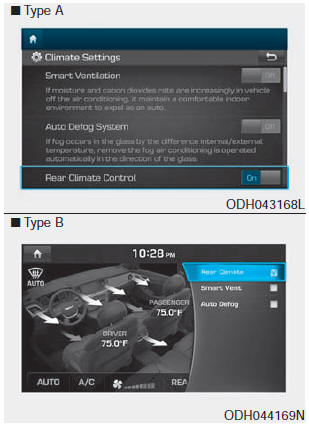
To cancel the rear climate system, turn off Rear Climate on the AVN climate monitor.
Automatic Air Conditioner with CO2 Control
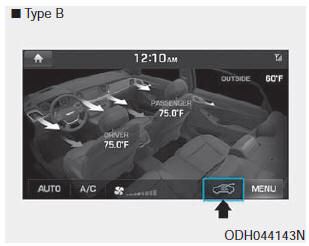
While driving, the automatic air conditioner monitors the CO2 concentration and maintains comfortable air in the vehicle.
When the system is controlling CO2, the symbol ( ) is displayed on the AVN monitor.
You can turn the CO2 control function on or off as shown below.
1. Start the engine.
2. While pressing the Driver Mode selection button, press the Air Intake control button (Recirculation) at least 4 times within 2 seconds.
Test yourself
A quick Hyundai Genesis DH quiz: every answer comes with an explanation and a link to the manual page.