Head-Up Display (HUD)
Description
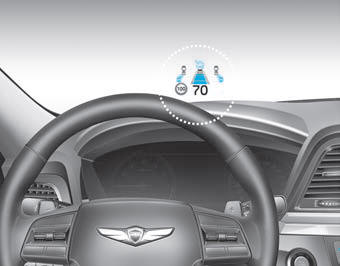
The head-up display is a transparent display that projects a small amount of information from the instrument cluster and navigation onto the windshield.
- The image on the head-up display on the windshield may be invisible when:
- Your seating posture is incorrect.
- You are wearing polarized sunglasses.
- There is an object on the head-up display cover.
- Driving on a wet road.
- Interior lighting is inadequate.
- Any light comes from outside the vehicle.
- You are wearing eyeglasses. - If the image on the head-up display is not shown clearly, adjust the height or brightness of the head-up display on the LCD display.
- When the head-up display requires inspection or repair, have the vehicle inspected by an authorized HYUNDAI dealer.
WARNING
Head-Up Display
- Do not tint the windshield or add other types of metallic coating. Otherwise, the head-up display image may be invisible.
- Do not place any accessories on the airbag cover or attach any objects to the windshield.
CAUTION
When replacing the windshield on a vehicle equipped with a head-up display, replace it with a windshield designed for head-up display operation. Otherwise, duplicated images may appear on the windshield.
Head-Up Display ON/OFF

To activate the Head-Up Display, select "Head-Up Display" in the "User Settings Mode" on the cluster.
If you do not select "Display," the Head-Up Display will be deactivated.
Head-Up Display Information

1. Turn-By-Turn (TBT) Navigation Information
2. Road Signs
3. Speedometer
4. Cruise Control Set Speed
5. Advanced Smart Cruise Control (ASCC) Information (if equipped)
6. Lane Keeping Assist System (LKAS) Information
7. Blind-Spot Detection (BSD) Information (if equipped)
8. Warning Lights (Low Fuel)
9. Audio/Video Information
In the "User Settings Mode" on the LCD, you can activate or deactivate Turn-By-Turn (TBT) Navigation, Smart Cruise Control (SCC), Lane Keeping Assist System (LKAS), and Blind-Spot Detection (BSD) Information.
✽ NOTICE
If you select Turn-By-Turn (TBT) Navigation Information as HUD Content, Turn-By-Turn (TBT) Navigation Information will not be displayed on the LCD Display.
Windshield Display Settings
On the LCD, you can change the Head-Up Display settings as follows.
1. Head-Up Display On/Off
2. Display Height
3. Rotation
4. Brightness
5. Content Settings
6. Speedometer Number Size
7. Speedometer Number Color
Test yourself
A quick Hyundai Genesis DH quiz: every answer comes with an explanation and a link to the manual page.