Body Electrical System
Front LCD Monitor Repair Procedures
In this manual: Body Electrical System
6steps
~36min
2/5difficulty
Done 0 of 6
Removal
|
- Disconnect the negative (-) battery terminal.
- Remove the side crash pad garnish assembly. (Refer to Body - "Side Crash Pad Garnish Assembly")
When working with the matte wood trim, pay close attention to the following.
- When removing with a screwdriver or pry tool, wrap the tools with protective tape.
- Be careful not to damage the parts, as the matte wood trim is easily scratched or torn.
- Take care when storing and handling the protective garnish during removal/installation, as grease and oil may leave stains on the trim.
- Remove the monitor bezel. (Refer to Body - "Main Lower Airbag Assembly")
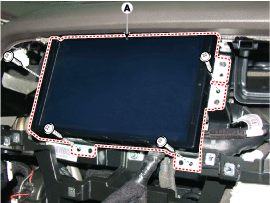
- Remove the front LCD monitor by loosening the mounting screws.
Installation
- Install the front LCD monitor after connecting the connector.
- Install the monitor bezel.
- Make sure the cables and connectors are connected correctly.
- Check the AVN system for normal operation.
Test yourself
A quick Hyundai Genesis DH quiz: every answer comes with an explanation and a link to the manual page.
Was this page helpful?