High Beam Assist (HBA) System
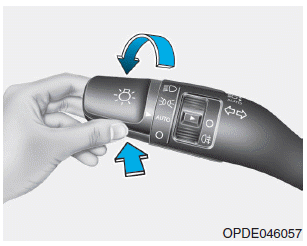
Operating Condition
1. Set the light switch to the AUTO position.
2. Turn on the high beams by pushing the lever away from you.
3. High Beam Assist (HBA) ( ) will illuminate.
4. The High Beam Assist (HBA) system will activate when vehicle speed exceeds 45 km/h (25 mph).
1) If the light switch is pushed forward while the High Beam Assist (HBA) system is operating, the HBA system will be canceled and the high beams will remain on.
2) If the switch is pulled toward you when the high beams are off, the high beams will turn on without canceling the High Beam Assist (HBA) system. When you release the switch, the lever will return to the center position and the high beams will turn off.
3) If the light switch is pulled toward you while the high beams are on, the High Beam Assist (HBA) system will turn on the low beams and turn off the HBA system.
4) If the light switch is set to the headlight position, the High Beam Assist (HBA) system will turn off and the low beams will remain on.
When the High Beam Assist (HBA) system is operating, the high beams are switched to low beams under the following conditions.
- When the headlights of an oncoming vehicle are detected.
- When the taillights of a vehicle ahead are detected.
- When the headlights or taillights of a bicycle or motorcycle are detected.
- When there is sufficient surrounding light and high beams are not needed.
- When street lights or other lights are detected.
- When the light switch is not in the AUTO position.
- When the High Beam Assist (HBA) system is turned off.
- When vehicle speed is below 35 km/h.
Test yourself
A quick Hyundai Kona quiz: every answer comes with an explanation and a link to the manual page.