Propeller Shaft and Axle (2WD-FF)
Rear Hub - Carrier Repair Procedures
In this manual: Propeller Shaft and Axle (2WD-FF)
15steps
~90min
4/5difficulty
Done 0 of 15
Removal
- Loosen the wheel nuts slightly. Raise the vehicle and make sure it is securely supported.
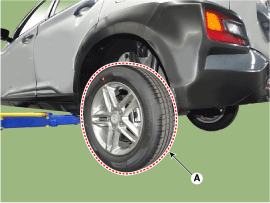
- Remove the rear wheel and tire (A) from the rear hub.
Tightening torque: 107.9–128 N·m
- Remove the rear brake caliper. (Refer to Brake System - "Rear Disc Brake")
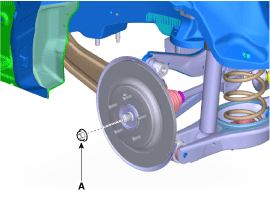
- Remove the driveshaft seal nut (A).
Tightening torque: 274.6 - 294 N·m
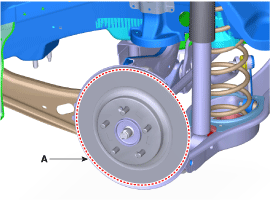
- Loosen the screws and remove the rear brake disc (A).
Tightening torque: 4.9–5.9 N·m
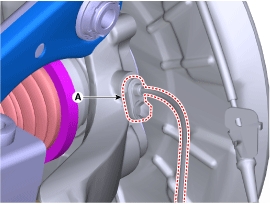
- Loosen the bolt and remove the rear wheel speed sensor (A).
Tightening torque: 6.9–10.8 N·m
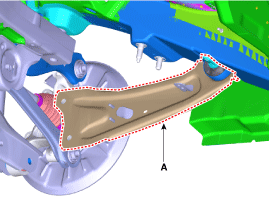
- Remove the trailing arm (A) from the rear carrier assembly. Tightening torque: Front: 98.1–118 N·m; Rear: 137.2–157 N·m
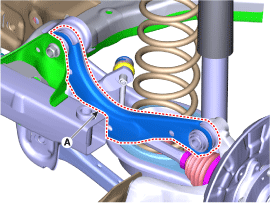
- Remove the upper arm (A) after loosening the bolt and nut.
Tightening torque: 137.2–157 N·m
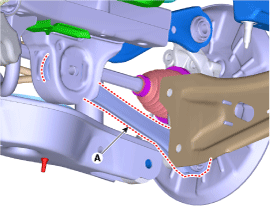
- Remove the auxiliary arm (A) after loosening the bolt and nut.
Tightening torque: 137.2–157 N·m
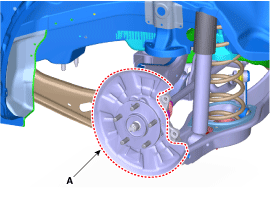
- Remove the hub assembly and dust cover (A) after loosening the bolt.
Tightening torque: 78.5–98 N·m
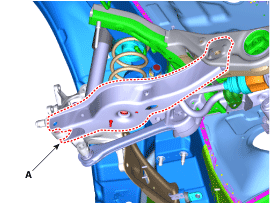
- Remove the lower arm (A) from the rear carrier assembly.
Tightening torque: 137.2–157 N·m
Inspection
- Check the hub for cracks and worn splines.
- Check the rear axle beam for cracks.
Installation
- Install in the reverse order of removal.
- Check the alignment. (Refer to Suspension System - "Alignment")
Test yourself
A quick Hyundai Kona quiz: every answer comes with an explanation and a link to the manual page.
Was this page helpful?