Trip Information Display
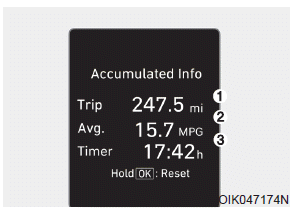
This display shows the accumulated driving distance (1), average fuel economy (2), and total driving time (3).
Information is accumulated from the last reset.
To reset the data, press and hold the OK button while viewing the Accumulated Driving Information. Trip distance, average fuel economy, and total driving time will be reset at the same time.
Accumulated driving information will continue to be recorded while the engine is running (for example, when the vehicle is moving or stopped at a traffic light).
Information
The vehicle must be driven at least 0.19 mile (300 meters) after the last ignition key cycle before the average fuel economy is recalculated.
Test yourself
A quick Hyundai Palisade quiz: every answer comes with an explanation and a link to the manual page.