Average Fuel Economy / Instant Fuel Economy
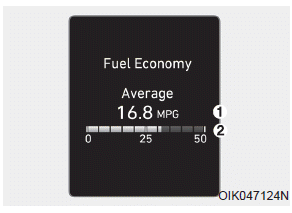
Average Fuel Economy (1)
- The average fuel economy is calculated based on the total distance driven and the fuel consumed since the last average fuel economy reset.
- The average fuel economy can be reset either manually or automatically.
Manual Reset
To reset the average fuel economy manually, press and hold the OK button on the steering wheel for more than 1 second while the average fuel economy is displayed.
Automatic Reset
To automatically reset the average fuel economy, select either "After Ignition ON" or "After Refueling" in the User Settings Mode on the LCD display in the cluster.
- After Ignition ON: When the engine has been OFF for 4 hours or longer, the average fuel economy will be reset automatically.
- After Refueling: The average fuel economy will be reset automatically after adding 1.6 gallons (6 liters) or more of fuel and after driving at a speed above 1 mile per hour (1 km/h).
Information
The vehicle must be driven at least 0.19 mile (300 meters) after the last ignition key cycle before the average fuel economy is recalculated.
Instant Fuel Economy (2)
• Instant fuel economy is displayed in accordance with the bar graph on the LCD display while driving.
Test yourself
A quick Hyundai Palisade quiz: every answer comes with an explanation and a link to the manual page.