Exterior Lighting
Lighting Control
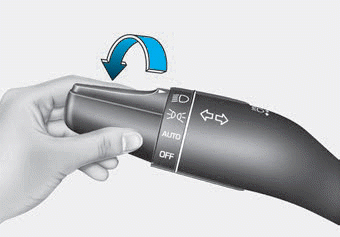
To turn on the lights, turn the knob at the end of the control lever to one of the following positions:
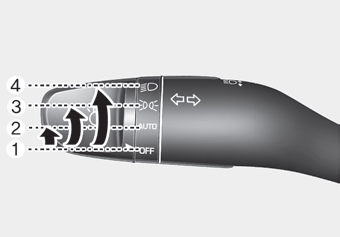
1. OFF position
2. AUTO light position
3. Parking light position
4. Headlight position
Daytime Running Light (DRL)
Daytime Running Lights (DRL) can help make your vehicle more visible to others from the front during the day, especially after dawn and before sunset.
The DRL system will turn the dedicated light OFF when:
- Headlamps on.
- The parking lights are on.
- The vehicle is turned off.
- The parking brake is engaged.
AUTO light position
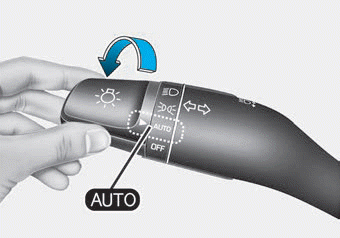
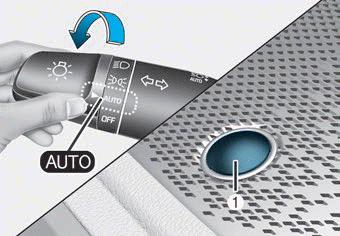
The parking lights and headlights will turn on or off automatically depending on the amount of daylight measured by the ambient light sensor (1) on the center panel.
Even with the AUTO headlight function in operation, it is recommended that you manually turn on the headlights when driving at night or in fog, rain, or when entering dark areas such as tunnels and parking garages.
NOTICE
- Do not cover or spill anything on the sensor (1) located on the top of the instrument panel.
- Do not clean the sensor with window cleaner. The cleaner may leave a thin film that can interfere with sensor operation.
- If your vehicle has tinted windows or other metallic coatings on the windshield, the AUTO headlight system may not operate properly.
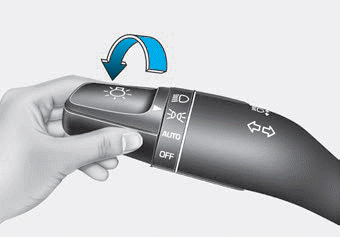
Parking light position ( )
The parking lights, license plate lights and instrument panel lights are on.
Headlight position ( )
The headlights, parking lights, license plate light and instrument panel lights are on.
Information
The ignition switch must be in the ON position to turn on the headlights.
Test yourself
A quick Hyundai Palisade quiz: every answer comes with an explanation and a link to the manual page.