Body Electrical System
IMS (Integrated Memory System)
In this manual: Body Electrical System
20steps
~120min
4/5difficulty
Done 0 of 20
Specifications
Specifications
Power Seat with Memory| Item | Specification |
| Rated Voltage | 12 V DC |
| Operating Voltage | 9 V DC - 16 V |
| Operating Temperature | -30°C to 75 °C |
| Parasitic Current | Max. 1 mA |
Power Seat Memory Switch
| Item | Specification |
| Rated Voltage | DC12V |
| Type | Soft click feel |
| Temperature range category | -30°C to 80 °C |
Components and Component Location
Component Location

| 1. Seat Memory Unit (IMS) 2. IMS Control Switch |
3. Outside Mirror 4. IMS Mirror Control (Driver Window Switch) |
Description and Operation
Description
The optimal seat position set by the driver is stored in the power seat memory via the IMS switch. If the position is changed, the seat can return to its preset position using the IMS switch. It has safety functions that prohibit the recall process while driving and stop the related movement in an emergency. The main functions are as follows.- Manual Operation: Motor operation using the manual seat switch.
- Seat position is changed by motor when a signal is input from the manual seat switch (slide, recline, front tilt, height-adjustable cushion, cushion extension).
- Memory function: Available to store and recall data for two persons using the IMS switch.
- Memory movement to the optimal seat position set by the driver based on CAN data from the DDM → IMS module, using the IMS switch.
- Recall via CAN of data received from the DDM when the IMS switch is operated.
- Ignition-Linked Movement
- This function links movement to the engine ON/OFF state.
- Using MS IN data transmission.
- Start conditions: When power is turned off, the vehicle is in ACC.
Operation
Recall Movement- If recall CAN data is received from the DDM, the buzzer sounds once and the seat automatically moves to the stored position.
- Stored CAN data that has not been memorized does not perform the recall function.
- If CAN data is received again during a previous data recall, the last received data has priority.
- If recall CAN data is received by pressing button 1 or 2 during recall, the seat stops the recall process.
- If stored CAN data is received by pressing the SET button during recall, the seat stops the recall process.
Press the SET button again to save the stop position.
- Automatic stop when the restart switch is turned off during recall.
- Do not start the engine if the difference between the stored recall position and the current position is less than 4 pulses.
- IGN2 OFF (except for 30 seconds after opening or closing a door.)
- Vehicle speed above 3 km/h
- When the switch is operated manually
- Operation Timing Chart
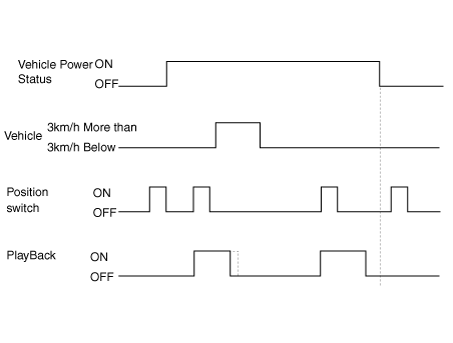
- For automatic control, engine start must be delayed by 100 ± 10 msec to prevent overlap of the starting circuit. In this case, priority is given as follows: Slide > Recliner adjustment > Front seat height adjustment > Rear seat height adjustment > Cushion extension adjustment. Operation timing chart
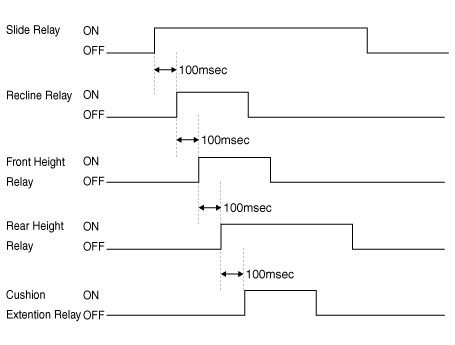
- Reverse movement when pushing and forward movement when pulling (applies to slide only).
- Available when the automatic SET signal is transmitted from the Driver Door Module (DDM) power seat switch is ON.
- Operation starts when the engine is off and the driver's seat door is opened.
- Movement to the target position at ACC ON.
- Operation prohibition conditions.
- Vehicle speed is 3 km/h or higher.
- The power seat manual switch is activated.
- Recall command is received when entering the vehicle.
- Driver Setting Menu (USM) is off.
Test yourself
A quick Hyundai Palisade quiz: every answer comes with an explanation and a link to the manual page.
Was this page helpful?