Advanced Driver Assistance System (ADAS)
Surround View Monitor (SVM) Camera
In this manual: Advanced Driver Assistance System (ADAS)
9steps
~54min
2/5difficulty
Done 0 of 9
Components and Component Location
Components
[Ultra Optical Camera — Right/Left]


Repair Procedures
Removal
|

- Disconnect the negative (-) battery terminal.
- Remove the front bumper cover. (Refer to Body - "Front Bumper Cover")
- Disconnect the front camera connector (A), loosen the mounting screws, and remove the front camera.
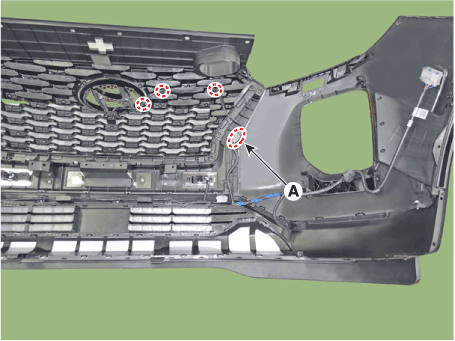
- Disconnect the negative (-) battery terminal.
- Remove the rear door trim panel. (Refer to Body - "Rear Door Trim")
- Remove the liftgate back panel. (Refer to Body - "Liftgate Back Panel")
- Disconnect the camera connector (A), loosen the mounting screws, and remove the rear view camera.
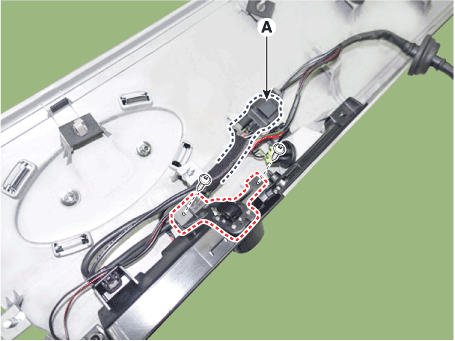
- Disconnect the negative (-) battery terminal.
- Remove the mirror. (Refer to Body - "Outside Rear View Mirror")
Installation
- To install, reverse the removal procedure.
Test yourself
A quick Hyundai Palisade quiz: every answer comes with an explanation and a link to the manual page.
Was this page helpful?