Advanced Driver Assistance System (ADAS)
Surround View Monitor (SVM) Unit
In this manual: Advanced Driver Assistance System (ADAS)
11steps
~66min
3/5difficulty
Done 0 of 11
Components and Component Location
Components
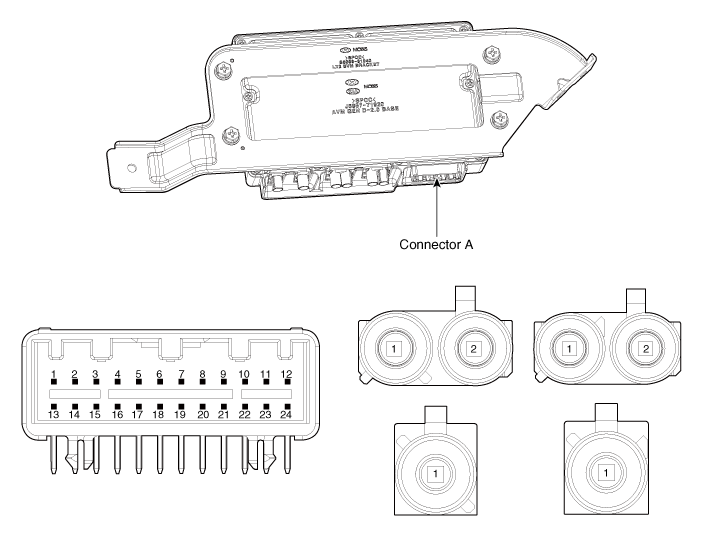
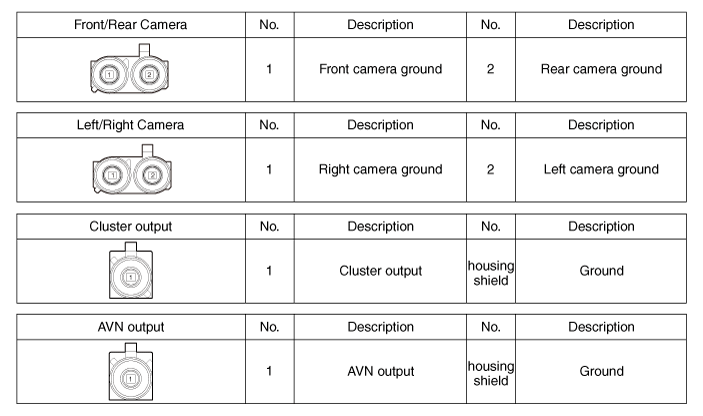
| No | Connector A |
| 1 | ACC |
| 2 | LED |
| 3 | EXTERNAL GROUND |
| 4 | Y-Shield |
| 5 | - |
| 6 | C-CAN Low |
| 7 | Y Video Ground |
| 8 | - |
| 9 | - |
| 10 | Rear Camera Power |
| 11 | Left Camera Power |
| 12 | Right Camera Power |
| 13 | Ignition |
| 14 | AVM Switch |
| 15 | - |
| 16 | C-Shield |
| 17 | - |
| 18 | C-CAN High |
| 19 | C Video Ground |
| 20 | C Video Output |
| 21 | - |
| 22 | - |
| 23 | Left Camera Ground |
| 24 | Right Camera Ground |
Repair Procedures
Removal
- Disconnect the negative (-) battery terminal.
- Remove the emergency pad lower panel. (Refer to Body - "Emergency Pad Lower Panel")
- Disconnect the SVM unit connector.
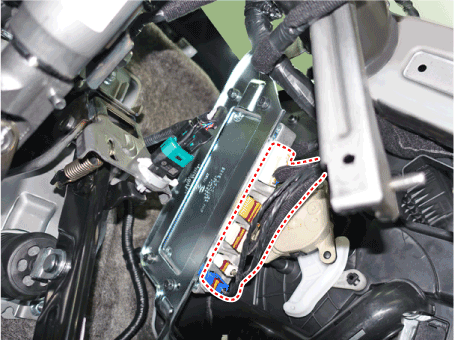
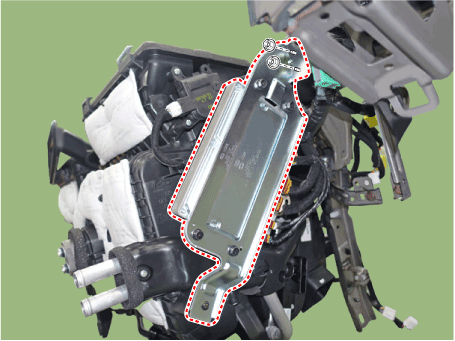
- Remove the SVM unit after loosening the mounting bolts and screw.
Installation
- Install the AVN head unit after connecting the connectors and cable of the AVN head unit.
- Install the emergency pad lower panel.
- Connect the negative (-) battery terminal.

- Make sure the cables and connectors are connected correctly.
- Check the AVN system for normal operation.
Inspection
How to Check the AVN Head Unit When Replacing (Variant Coding)
The AVN head unit performs the main audio, video and navigation functions. It also receives general vehicle information from other units (SWRC, FATC, BCM, PGS, AVM, Cluster, TMU, ECS, etc.) via CAN communication and provides it to the driver. Therefore, when replacing the AVN head unit, always enter the detailed option information for each vehicle model into the new AVN unit for correct system operation. This process is called variant coding.
|

- Check the options installed on the vehicle before performing AVN head unit variant coding.
- Select the vehicle, then select "variant coding", the additional function of the AVN head unit.
- Configuring options installed on the vehicle.
If you enter an incorrect option, the AVN head unit will not operate correctly.
After replacing the head unit, complete the replacement, stop the engine, and close and lock the door. Do not drive the vehicle for at least three minutes so that the coded data is saved. The code is saved to the head unit only when the AVN system is fully turned off and then awakened.
- Follow the on-screen instructions and wait. Wait until it is fully saved and then exit.
Test yourself
A quick Hyundai Palisade quiz: every answer comes with an explanation and a link to the manual page.
Was this page helpful?