Operating the Door Locks from the Outside of the Vehicle
Mechanical Key
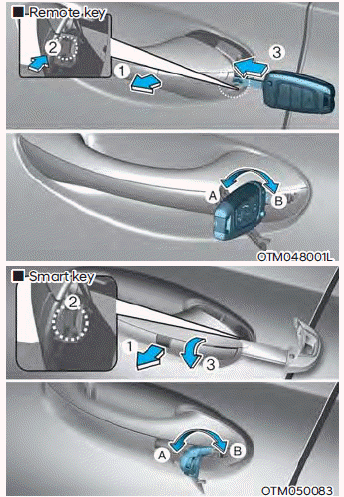
[A]: Unlock, [B]: Lock
First, pull the outside door handle (1) and press the hook (2) located inside the outside door handle with the mechanical key. Then remove the cover (3).
Turn the key toward the rear of the vehicle to lock, and toward the front of the vehicle to unlock.
If you lock/unlock the driver's door with the key, the driver's door locks/unlocks.
When the doors are unlocked, they can be opened by pulling the door handle.
When closing a door, push the door with your hand. Make sure the doors are securely closed.
Remote Key
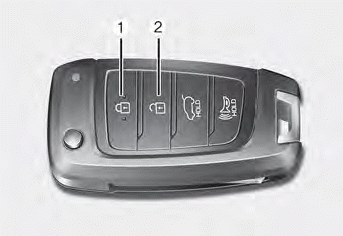
To lock the doors, press the door lock button (1) on the remote key.
To unlock the doors, press the door unlock button (2) on the remote key.
When the doors are unlocked, they can be opened by pulling the door handle.
When closing a door, push the door with your hand. Make sure the doors are securely closed.
Smart Key
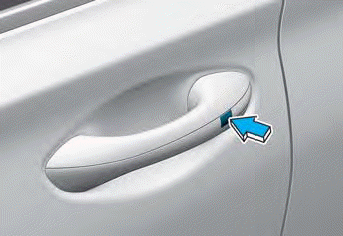
To lock the doors, press the button on the outside door handle while carrying the smart key, or press the door lock button on the smart key.
To unlock the doors, press the button on the outside door handle while carrying the smart key, or press the door unlock button on the smart key.
When the doors are unlocked, they can be opened by pulling the door handle.
When closing a door, push the door with your hand. Make sure the doors are securely closed.
Information
- In cold and humid climates, the door lock and door mechanisms may not operate properly due to freezing conditions.
- If the door is locked/unlocked several times in quick succession with the vehicle key or door lock switch, the system may temporarily stop operating to protect the circuit and prevent damage to system components.
Test yourself
A quick Hyundai Santa Fe quiz: every answer comes with an explanation and a link to the manual page.