Operating the door locks from inside the vehicle
Using the door lock button
• To unlock the door, move the door lock button (1) to the "Unlock" position. A red mark (2) will be visible on the button.
• To lock the door, move the door lock button (1) to the "Lock" position. If the door is closed properly, the red mark (2) will not be visible on the door lock button.
• To open the door, pull its handle (3) toward you.
• The front door cannot be locked if the ignition key is in the ignition switch and the door is open (if equipped).
• The door cannot be locked if the smart key is inside the vehicle and any door is open.
WARNING
- Door lock malfunction
If the power door lock fails, a person inside the vehicle can use one of the following methods to get out:
• Try opening the door lock several times (both electrically and manually) while pulling the door handle toward you.
• Use the locks and handles of other doors, both front and rear.
• Lower the front door window and use the key to open the door from the outside.
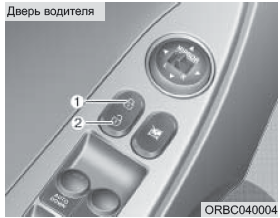
Vehicles equipped with a central door lock switch (if equipped)
Locking is controlled by pressing this switch.
• Pressing the front part (1) of the switch locks all vehicle doors.
• Pressing the rear part (2) of the switch unlocks all vehicle doors.
• If the ignition key is in the ignition switch or the smart key is inside the vehicle and any door is open, pressing the front part (1) of the central door lock switch will not lock the doors.
• If the smart key is inside the vehicle and one of the doors is open, the doors will not lock even if the front part (1) of the central door lock switch is pressed.
NOTE
When the doors are locked with the smart key or remote control, they cannot be unlocked with the central door lock switch.
WARNING
- Doors
• While the vehicle is moving, the doors must always be fully closed and their locks engaged to prevent accidental door opening. In addition, locking the doors makes unauthorized entry into the vehicle more difficult when it is stopped or moving slowly.
• Be careful when opening the doors. Make sure no approaching vehicles, motorcycles, cyclists or pedestrians are in the path of the door. Opening a door when an approaching obstacle is present may cause injury to people or damage to property.
WARNING
- Vehicles with unlocked doors
Leaving the vehicle with unlocked doors may make it a target for thieves, or may allow an intruder who hides in the vehicle in your absence to cause harm to you or other people. When leaving the vehicle unattended, always remove the key from the ignition switch, apply the parking brake, close all windows and lock all doors.
WARNING
- Children left unattended
The interior of a closed vehicle can become extremely hot, which may result in death or injury to children or animals left unattended who cannot get out of the vehicle.
In addition, children may start playing with potentially dangerous interior parts of the vehicle, or be exposed to other hazards, such as an unauthorized person entering the vehicle. Never leave children or animals unattended in the vehicle.
Door unlocking system with impact sensor (if equipped)
When the airbags deploy due to an impact, all doors are automatically unlocked.
Door locking system while driving (if equipped)
All doors are automatically locked when the vehicle speed exceeds 15 km/h or 40 km/h.
Engine Stop Auto Unlock (if equipped)
All doors will unlock automatically:
Without Smart Key System
When the key is removed from the ignition switch.
With Smart Key System
When the ENGINE START/STOP button is in the OFF position.
NOTE
An authorized HYUNDAI dealer can enable or disable some of the following automatic door lock/unlock features:
• Auto Door Lock with Vehicle Speed
• Engine Stop Auto Door Unlock
Test yourself
A quick Hyundai Solaris quiz: every answer comes with an explanation and a link to the manual page.