Multimedia System
Audio head unit
In this manual: Multimedia System
~1min read
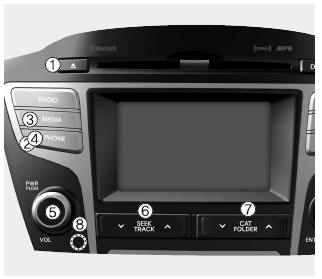
1.  (EJECT) Ejects the disc.
2. 
- Switches to radio mode.
- Each time the button is pressed, the mode changes in the following order: FM1, FM2, AM, XM1, XM2, XM3.
3. 
- Switches to media mode.
- Each time the button is pressed, the mode changes in the following order: CD, USB (iPod®), AUX, My Music, BT Audio.
4.  (for models equipped with Bluetooth® wireless technology)
Switches to phone mode.
❈ If a phone is not connected, the connection screen is displayed.
5. PWR/VOL knob
 Power: Press to turn the power on/off.
 Volume: Turn left/right to adjust the volume.
6. 
- Briefly press (less than 0.8 seconds) - Radio mode: Moves to the previous/next frequency. Media modes (CD/USB/iPod®/My Music): Changes the track or song (file). Press and hold (more than 0.8 seconds) - Radio mode: Continuously changes the frequency. After release, plays the current frequency. Media (CD/USB/iPod®/My Music): Fast-forwards or rewinds the track or file. During a hands-free call, adjusts the call volume.
- Press and hold (more than 0.8 seconds): Radio mode: continuously changes the frequency. After releasing, plays the current frequency. Media (CD/USB/iPod®/My Music): rewinds or fast-forwards the track or file. During a hands-free call, adjusts the call volume.
17. 
- XM RADIO™: Searches by category.
- CD, MP3/USB modes: Searches folders.
8. RESET: Forcibly shuts down the system and restarts the system.
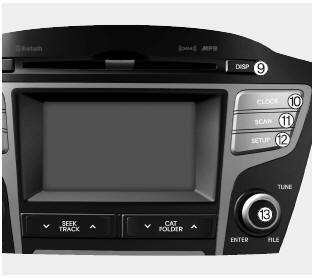
9.  Turns the monitor display on/off.
10.  Displays the time/date/day.
11. 
- Radio mode: Previews all receivable broadcasts for 5 seconds each.
- Media modes (CD/USB/My Music): Previews each song (file) for 10 seconds each.
12.  Switches to setup mode.
13.  SETUP knob
- Radio mode: Turn to change the broadcast frequencies.
- Media modes (CD/USB/iPod®/My Music): Go to the track/channel/file search.
14. Disc Indicator
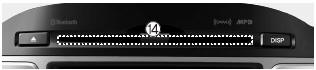
Indicator light showing whether a disc is inserted.
15. 
- XM RADIO™: Searches by category.
- CD, MP3/USB modes: Searches folders.
Test yourself
A quick Hyundai Tucson LM quiz: every answer comes with an explanation and a link to the manual page.
Was this page helpful?