Forward Collision-Avoidance Assist Settings
Forward Safety
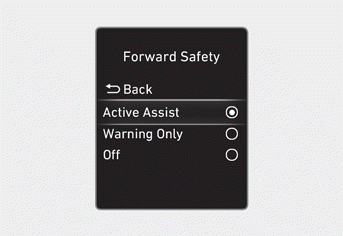
With the ignition ON, go to User Settings > Driver Assistance > Forward Safety (for cluster type) or Setup > Vehicle > Driver Assistance > Forward Safety (for infotainment system type) in the settings menu to select one of the following:
- If Active Assist is selected, the Forward Collision-Avoidance Assist warning message will be displayed and a warning sound will be heard. If necessary, it may assist with braking your vehicle depending on the degree of collision risk.
- If Warning Only is selected, the Forward Collision-Avoidance Assist system only displays a warning message and sounds a warning sound depending on the collision risk level. The system does NOT brake your vehicle to help avoid a collision.
- If Off is selected, Forward Collision-Avoidance Assist is disabled.
 the warning light illuminates on the instrument cluster.
You can check whether the Forward Collision-Avoidance Assist system is turned on or off in the Settings menu. Ifthe warning light remains on when the Forward Collision-Avoidance Assist system is enabled, have the vehicle inspected by an authorized HYUNDAI dealer.
WARNING
Each time the engine is restarted, Forward Collision-Avoidance Assist turns on.
If the engine restarts after the vehicle is parked, the function works. Do NOT brake the vehicle to avoid a collision.
Information
You can change the warning timing and warning volume, or select Driving Safety Priority for Forward Collision-Avoidance Assist in the Settings menu. For more information, refer to "Driver Assistance System Settings" in this chapter.
Test yourself
A quick Hyundai Tucson LM quiz: every answer comes with an explanation and a link to the manual page.