Driver Assistance System
Highway Driving Assist Settings
In this manual: Driver Assistance System
~1min read
Highway Driving Assist
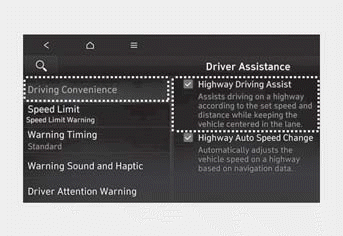
With the ignition ON, select Settings > Vehicle > Driver Assistance > Driving Convenience > Highway Driving Assist (for Infotainment System) from the Settings menu to turn Highway Driving Assist on or off.
- When Highway Driving Assist is selected, the function helps maintain a distance from the vehicle ahead, maintains the set speed, and helps center the vehicle in the lane while driving on highways.
Information
- When there is a problem with Highway Driving Assist, the function cannot be set from the Settings menu. Have the vehicle inspected by an authorized HYUNDAI dealer.
- When the engine is restarted, the function retains the last setting.
WARNING
Change the settings only after parking your vehicle in a safe place.
Information
You can change the warning volume setting or select Driving Safety Priority for Highway Driving Assist from the Settings menu. For more information, see "Driver Assistance System Settings" in this chapter.
Test yourself
A quick Hyundai Tucson LM quiz: every answer comes with an explanation and a link to the manual page.
Was this page helpful?