Multimedia System
List Menu
In this manual: Multimedia System
~1min read
On the list screen, you can delete files that you have previously saved to My Music.
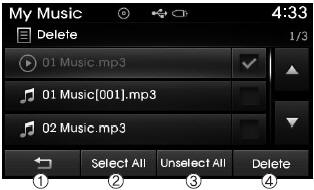
press button, or individually select the files you want to delete. After the files are selected,
 button and
 buttons will be activated.
1)  : Returns to the previous screen
2) Select All: Selects all files.
3) Unselect All: Cancels the selection of all selected files.
4) Delete: Deletes the selected files.
After selecting the files you want to delete, press the button to delete the selected files.
✽ NOTICE
- If there is free memory, up to 6000 files can be saved.
- Identical files cannot be copied more than 1000 times.
- To check memory information, go to

 [System]
 [Memory Information]
✽ NOTICE - USING THE Bluetooth® Wireless Technology Audio Mode
- The Bluetooth® Wireless Technology Audio mode can only be used if a Bluetooth® Wireless Technology phone has been connected.
- The Bluetooth® Wireless Technology Audio mode will not be available if mobile phones that do not support this function are connected.
- During Bluetooth® Wireless Technology audio playback, if a Bluetooth® Wireless Technology phone is connected, the music will also stop.
- Moving the track up/down during Bluetooth® Wireless Technology audio playback may cause popping noises on some mobile phones.
- Bluetooth® Wireless Technology audio streaming may not be supported on some mobile phones.
- When returning to Bluetooth® Wireless Technology Audio mode after a call ends, the mode may not restart automatically on some mobile phones.
- Receiving an incoming call or making an outgoing call during Bluetooth® Wireless Technology audio playback may cause audio interference.
Test yourself
A quick Hyundai Tucson LM quiz: every answer comes with an explanation and a link to the manual page.
Was this page helpful?