Multimedia System
Using My Music Mode
In this manual: Multimedia System
~1min read
My Music File Play/Pause
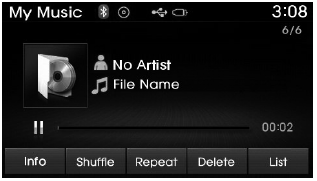
During playback, press the button to pause, then press the
 Press the button to play.
✽ NOTICE
If there are no saved files in the My Music folder, the [My Music] button will not function.
Changing Files
press Press the key to move to the previous or next file.
✽ NOTICE
- Pressing the
 key after the file has played for 2 seconds will restart the current file from the beginning.
- Pressing the
 key within 1 second of the file starting will play the previous file.
Selecting from the List
Turn Turn the TUNE knob left/right to search for the desired file.
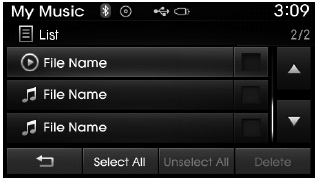
Once you find the desired file, press the TUNE knob to start playback.
Fast Forward/Rewind Files
During playback, press and hold the button (more than 0.8 seconds) to rewind or fast forward the current file.
Scan
press button to play the first 10 seconds of each file.
Test yourself
A quick Hyundai Tucson LM quiz: every answer comes with an explanation and a link to the manual page.
Was this page helpful?