Rear View Monitor Settings
Camera Settings
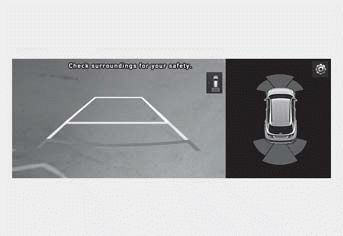
To change the rear view monitor display content or display settings, press the settings icon ( ) on the screen while the rear view monitor is on, or select Setup > Vehicle > Driver Assistance > Parking Safety > Camera Settings from the settings menu on the infotainment system while the engine is on.
- If Display Content is selected, you can change the settings for the Extended Rear View Monitor or Rear View Parking Guide.
- If Display Settings is selected, you can change the screen brightness and contrast.
Extended Rear View Monitor
If Extended Rear View Monitor is selected, the rear view is maintained on the screen when parking.
Parking Guide Rear View
If the Rear View Parking Guide is selected, the parking guide lines will appear when the rear view and top rear view are displayed.
Information
- The horizontal rear view guide lines show distances of approximately 1.6 ft (0.5 m), 3.3 ft (1 m), and 7.6 ft (2.3 m) from the vehicle.
- The horizontal top rear view guide line shows the rear door opening distance of approximately 4.9 ft (1.5 m) from the vehicle.
Information
You can select Driving Safety Priority for the rear view monitor from the settings menu. For more information, refer to the "Driver Assistance System Settings" section in this chapter.
Test yourself
A quick Hyundai Tucson LM quiz: every answer comes with an explanation and a link to the manual page.