Driver Assistance System
Rear Cross-Traffic Collision-Avoidance Assist Settings
In this manual: Driver Assistance System
~1min read
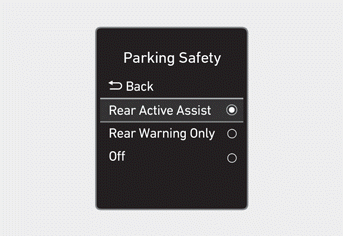
With the ignition on, go to User Settings > Driver Assistance > Parking Safety (for cluster type) or Setting > Vehicle > Driver Assistance > Parking Safety (for infotainment system type) in the settings menu to select one of the following:
- If Rear Active Assist is selected, Rear Parking Collision-Avoidance Assist warns and assists with braking when a pedestrian or object is detected.
- If only Rear Warning is selected, Rear Parking Collision-Avoidance Assist warns of a collision with a detected pedestrian or object. Braking assistance is not provided.
- If Off is selected, the Rear Parking Collision-Avoidance Assist is disabled.
Information
You can change the warning volume setting for the Rear Parking Collision-Avoidance Assist from the settings menu. For more information, refer to the "Driver Assistance System Settings" section in this chapter.
Test yourself
A quick Hyundai Tucson LM quiz: every answer comes with an explanation and a link to the manual page.
Was this page helpful?