Driver Assistance System
Warning Volume
In this manual: Driver Assistance System
~1min read
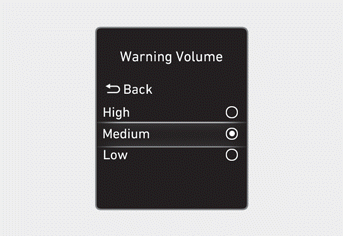
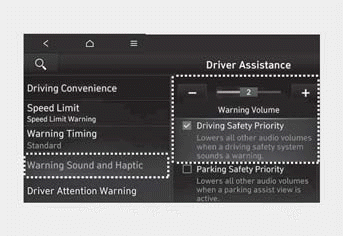
The warning volume can be adjusted with the Settings menu in the instrument cluster or the infotainment system when the ignition is on.
Select:
- User Settings > Driver Assistance > Warning Volume (for cluster type)
- Settings > Vehicle > Driver Assistance > Warning Sound & Haptic > Warning Volume (for Infotainment type system)
If Driving Safety Priority is selected from the settings menu in the infotainment system, your vehicle reduces all other sound volumes when the driver assistance system warning sounds.
Information
- When the engine is restarted, the Warning Volume remains at the last setting.
- The Driving Safety Priority setting applies to the warning sounds for Forward Collision-Avoidance Assist, Lane Keeping Assist, Blind-Spot Collision-Avoidance Assist, Safe Exit Warning, Smart Cruise Control and Autonomous Emergency Braking warnings.
Test yourself
A quick Hyundai Tucson LM quiz: every answer comes with an explanation and a link to the manual page.
Was this page helpful?