Steering Play Adjustment
- Remove: Steering Stem Head with Handlebars (see Handlebar Removal in the Steering chapter).
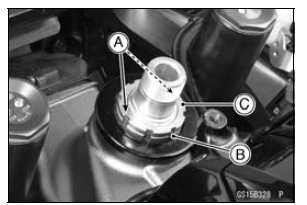
- Bend the claws [A] of the claw washer [B] straighten.
- Remove: Steering Stem Locknut [C] Claw Washer
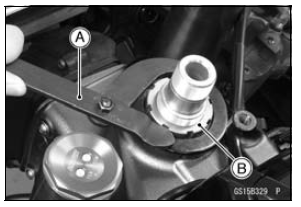
- Adjust the steering using the steering stem nut wrench [A].
Special Tool - Steering Stem Nut Wrench: 57001-1100
If the steering is too tight, loosen the steering stem nut [B] a fraction of a turn.
If the steering is too loose, tighten the steering stem nut a fraction of a turn.
NOTE
Turn the steering stem nut 1/8 turn at time maximum.
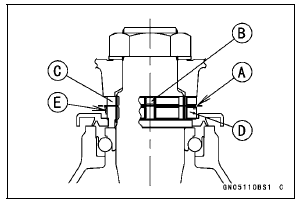
- Install the claw washer [A] so that its bent side [B] faces upward, and engage the bent claws with the grooves of steering stem locknut [C].
- Hand tighten the steering stem locknut until it touches the claw washer.
- Hand tighten the steering stem locknut clockwise until the claws are aligned with the grooves (ranging from 2nd to 4th) of steering stem nut [D], and bend the 2 claws downward [E].
- Install the steering stem head.
- Install the washer, and temporary tighten the steering stem head nut.
NOTE
Tighten the stem head nut first, then the upper front fork clamp bolts.
Torque - Steering Stem Head Nut: 78 NВ·m (8.0 kgfВ·m, 58 ftВ·lb) Front Fork Clamp Bolts (Upper): 20 NВ·m (2.0 kgfВ·m, 15 ftВ·lb)
WARNINGIf the handlebar does not turn to the steering stop it may cause an accident resulting in injury or death.
Be sure the cables, harnesses and hoses are routed properly and do not interfere with handlebar movement (see Cable, Wire, and Hose Routing section in the Appendix chapter).
- Check the steering again.
If the steering is still too tight or too loose, repeat the adjustment.
Test yourself
A quick Kawasaki Ninja ZX-10R quiz: every answer comes with an explanation and a link to the manual page.