Head-Up Display (HUD)
Description
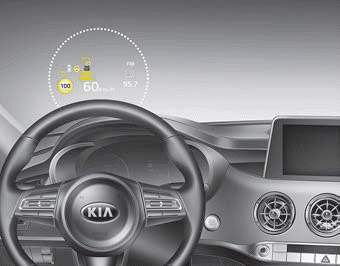
The head-up display is a transparent display that projects images of some instrument cluster and navigation information onto the windshield.
- The head-up display image on the windshield may not be visible when:
- Your seating position blocks visibility.
- You are wearing polarized sunglasses.
- An object is placed on the head-up display cover.
- Driving on a wet road.
- The interior lights are on.
- Any light enters from outside the vehicle.
- You are wearing glasses that do not match your eyesight. - If the head-up display image is not clear, adjust the height, rotation angle, or brightness of the head-up display in the LCD window. ❈ For more details, refer to "LCD Window" in this chapter.
- If the head-up display requires inspection or repair, contact an authorized Kia dealer.
- Do not place any accessories on the dashboard or attach any items to the windshield.
✽ NOTICE
Installing window tint or any other metallic coating on the windshield may prevent the driver from seeing images on the head-up display.
WARNING: Head-Up Display
The head-up display is a supplemental system. Do not rely solely on the system; always drive safely and pay attention to road conditions.
✽ NOTICE
When replacing the windshield on vehicles equipped with a head-up display, use a windshield designed for the head-up display. Otherwise, double images may appear on the windshield.
Head-Up Display ON/OFF
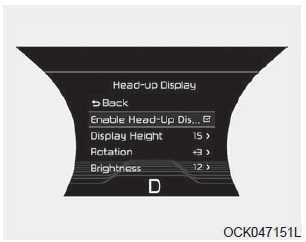
The head-up display will be activated or deactivated in the user settings mode when the engine is running.
Head-Up Display Information
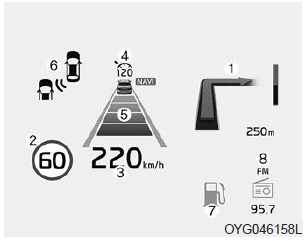
1. Turn-by-Turn Navigation Information
2. Road Sign Information
3. Speedometer
4. Cruise Control Set Speed
5. Smart Cruise Control (SCC) Information
6. Blind-Spot Collision Warning (BCW) Information
7. Warning Lights (Low Fuel)
8. AV Mode Information
Windshield Display Settings
On the LCD, you can change the Head-Up Display settings as follows.
1. Display Height
2. Rotation
3. Brightness
4. Content Selection
5. Speedometer Size
6. Speedometer Color
❈ For more details, refer to "LCD Window" in this chapter.
Test yourself
A quick Kia Stinger CK quiz: every answer comes with an explanation and a link to the manual page.