Audio head unit
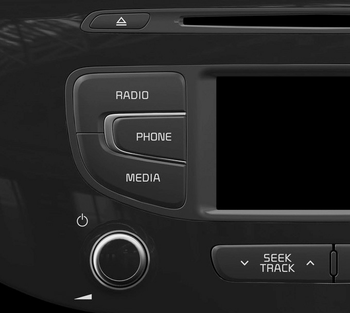
(1)  (EJECT) Ejects the disc.
(2) 
Switches to radio mode (FM/AM).
Each time the key is pressed, the mode changes in the order FM1 ➟ FM2 ➟ FMA ➟ AM ➟ AMA.
(3) 
Switches to phone mode.
❈ If a phone is not connected, the connection screen is displayed.
(4) 
Starts media mode.
Each time the key is pressed, the mode changes in the order CD, USB (iPod®) AUX, My Music, BT Audio.
(5) POWER/VOL knob
 Power: Press to turn the power on/off.
Volume: Turn left/right to adjust the volume.
(6) 
Short press (less than 0.8 seconds)
- Radio mode: Tunes to the previous/next frequency.
- Media (CD / USB / iPod® / My Music / BT Audio): Changes the track or song (file). Press and hold (0.8 seconds):
- Radio mode: Continuously changes the frequency. Plays the current frequency after release.
- Media (CD / USB / iPod® / My Music) modes: Fast-forwards or rewinds the track or file.
- During a hands-free call: Adjusts the call volume.
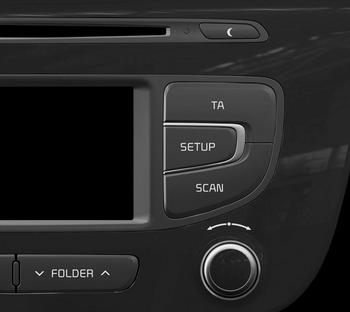
(7) 
• Each time the key is briefly pressed (less than 0.8 seconds), the display cycles: Screen Off ➟ Screen On ➟ Screen Off.
❈ Audio operation is maintained and only the screen is turned off. When the screen is off, press any key to turn the screen back on.
(8) 
Sets the TA (Traffic Announcement) function On or Off.
(9) 
Switches to setup mode.
(10) 
- Radio mode
- Press and hold (more than 0.8 seconds): Previews each broadcast for 5 seconds. - Media mode
- Press and hold (more than 0.8 seconds): Previews each song (file) for 10 seconds.
❈ Press and hold the key again to continue listening to the current song (file).
(11) SETUP knob
- Radio mode: Turn to change the broadcast frequency.
- Media (CD / USB / iPod® / My Music) modes: Turn to search for tracks/channels/files.
(12) 
MP3 CD/USB mode: Folder search
❈ May vary depending on the selected sound.
Test yourself
A quick Kia Cee'd quiz: every answer comes with an explanation and a link to the manual page.