Battery Replacement
The battery should last several years, but if the transmitter or Smart key does not operate normally, try replacing the battery with a new one. If you are unsure how to use or replace the battery, we recommend that you contact an authorized Kia dealer.
Enter
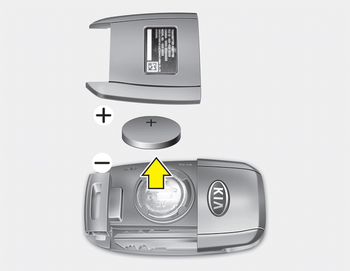
1. Insert a thin tool into the slot and carefully pry up the cover.
2. Replace the battery with a new one (CR2032). When replacing the battery, make sure the battery polarity is correct.
3. Install the rear cover.
Type B
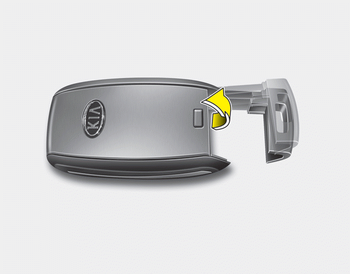
1. Insert a thin tool into the slot and carefully pry up the cover.
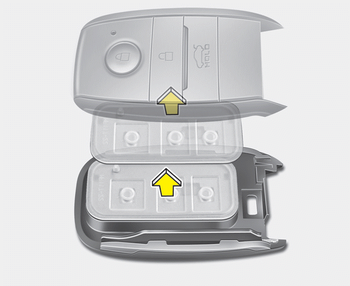
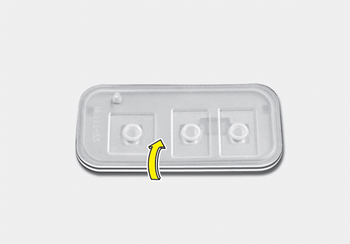
2. Pull out the Smart key module.
3. Turn the Smart key module over.
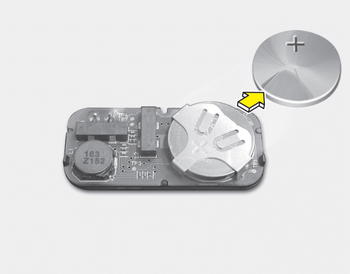
4. Push the battery out of the battery holder.
5. Replace the battery with a new one (CR2032). When replacing the battery, make sure the battery polarity is correct.
6. Install the battery in the reverse order of removal.
To replace the transmitter or Smart key, we recommend contacting an authorized Kia dealer.
CAUTION
- The transmitter or Smart key is designed to provide years of trouble-free use; however, it may malfunction when exposed to moisture or static electricity. If you do not know how to use or replace the battery, we recommend that you contact an authorized Kia dealer.
- Using an incorrect battery may cause the transmitter or Smart key to malfunction. Be sure to use the correct battery.
- To avoid damaging the transmitter or Smart key, do not drop it, get it wet, or expose it to heat or direct sunlight.
CAUTION
Improper battery disposal may harm the environment and human health.
Dispose of the battery in accordance with your local laws or regulations.
Test yourself
A quick Kia Cee'd quiz: every answer comes with an explanation and a link to the manual page.