Smart Trunk
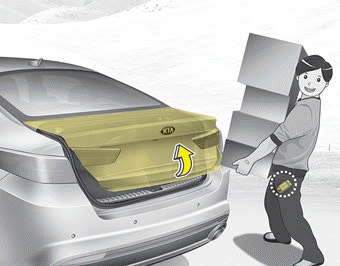
On a vehicle equipped with a smart key, the trunk lock can be opened hands-free by activating the Smart Trunk system.
How to Use the Smart Trunk
The trunk can be opened using the Smart Trunk function if the following conditions are met:
- More than 15 seconds have passed since all doors were closed and locked.
- The smart key has been within the detection area for more than 3 seconds.
✽ NOTICE
- Smart Trunk does not operate when:
- The smart key is detected within 15 seconds after all doors are closed and locked, and is continuously detected.
- The smart key is detected within 15 seconds after all doors are closed and locked, and is 1.5 m (60 in.) from the front door handles (for vehicles equipped with welcome lights).
- A door is unlocked or open.
- The smart key is inside the vehicle.
1. Setting
To activate Smart Trunk, enter User Settings mode and select Smart Trunk on the LCD display.
❈ For more details, refer to "LCD Display" in this section.
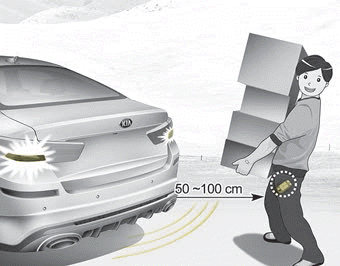
2. Detection and Warning
If you are within the detection area (50 ~ 100 cm (20 ~ 40 in.) behind the vehicle) with the smart key, the hazard warning lights will flash and the horn will sound for approximately 3 seconds to warn you that the smart key has been detected and the trunk will open.
✽ NOTICE
Do not approach the detection area if you do not want the trunk to open. If you accidentally enter the detection area and the hazard warning lights flash and the warning sound starts, leave the detection area with the smart key. The trunk will remain closed.
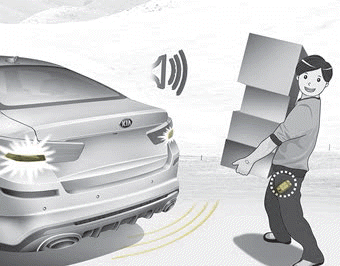
3. Automatic Opening
The hazard warning lights will flash, the horn will sound twice, and then the trunk lock will be unlocked.
Make sure to close the trunk before driving the vehicle.
Before opening or closing, make sure there are no people or objects around the trunk.
Before washing the vehicle, be sure to deactivate the Smart Trunk function.
Otherwise, the trunk may open unintentionally.
WARNING
Make sure items in the rear cargo area do not fall out when opening the trunk, as this may cause serious injury.
✽ NOTICE
Keep the key out of reach of children. Children may accidentally open the Smart Trunk while playing near the rear of the vehicle.
How to Deactivate the Smart Trunk Function Using the Smart Key
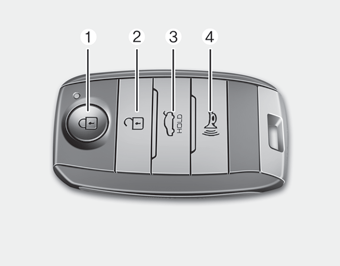
1. Door lock
2. Door unlock
3. Trunk open
4. Panic
If you press any smart key button during the detection and warning stage, the Smart Trunk function will be deactivated.
Make sure you know how to deactivate the Smart Trunk function for emergency situations.
✽ NOTICE
- If you press the door unlock button (2), the Smart Trunk function will be temporarily deactivated. However, if you do not open any door within 30 seconds, the Smart Trunk function will be reactivated.
- If you press and hold the trunk open button (3) for more than 1 second, the trunk will open.
- If you press the door lock button (1) or the trunk open button (3) when the Smart Trunk function is not in the detection and warning stage, the Smart Trunk function will not be deactivated.
- If you have deactivated the Smart Trunk function by pressing the Smart Trunk button on the key and opened a door, the Smart Trunk function can be reactivated by closing and locking all doors.
Detection Area
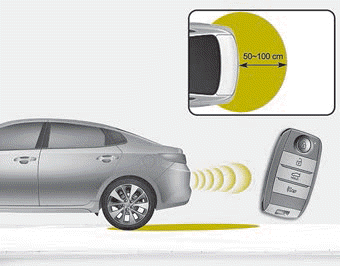
- Smart Trunk gives a welcome warning if the smart key is detected inside the 50 ~ 100 cm (20 ~ 40 in.) area from the trunk.
- The warning stops if the smart key is outside the detection area during the detection and warning stage.
✽ NOTICE
- The Smart Trunk function will not operate in the following cases:
- The Smart Key is near a radio transmitter, such as a radio station or airport radio station, which may interfere with normal transmitter operation.
- The Smart Key is near a mobile two-way radio system or cellular phone.
- A Smart Key from another vehicle is being used near your vehicle. - The detection range may decrease or increase when:
- One side of the vehicle is raised for tire replacement or vehicle inspection.
- The vehicle is parked on a slope, gravel road, or similar surface.
Test yourself
A quick Kia Optima DL3 quiz: every answer comes with an explanation and a link to the manual page.