Vehicle Specifications
Head-Up Display (HUD)
In this manual: Vehicle Specifications
~2min read
Description
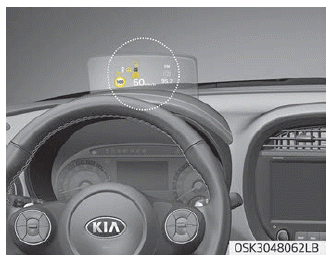
The head-up display is a transparent display that projects some information from the instrument cluster and navigation onto the HUD screen.
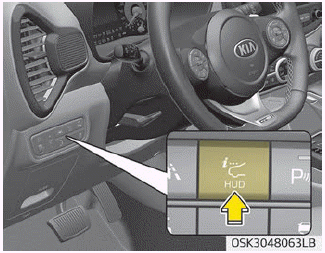
• Using the Head-Up Display
The hidden display will rise when you press the display control switch on the left side of the lower part of the airbag cover, and if you press the switch again, the display will return to its original hidden position.
- The head-up display automatically closes when the door is locked with the smart key while the vehicle is off.
- For vehicles with a smart key, the lock/unlock button on the outside handle of the front door automatically closes the head-up display when the door is locked.
- If you do not lock the door while the vehicle is off, the head-up display automatically closes after approximately 5 minutes.
- The head-up display image may not be visible when:
- Your seating posture is incorrect.
- You are wearing polarized sunglasses.
- An object is placed on the head-up display cover.
- Driving on a wet road.
- Insufficient lighting is present in the vehicle.
- Any light comes from outside.
- You are wearing glasses that do not suit your vision. - If the head-up display image is not clear, adjust the height, angle, or brightness of the head-up display in the instrument cluster.
- When the head-up display requires inspection or repair, Kia recommends visiting an authorized Kia dealer/service partner.
WARNING
Head-Up Display
- Do not attach stickers or accessories to the head-up display and the emergency pad.
- Do not manually adjust the shutter and combiner. Images may not be visible due to fingerprints. Excessive external force during operation may cause damage.
- Do not place any objects near the head-up display. Interference with the object during operation may damage it.
- Do not place any objects around the head-up display. They may enter the narrow gap of the cover and affect operation.
- Do not place any liquids around the head-up display. Water or other liquids may cause damage if they contact the head-up display.
- Do not expose the combiner to bright light. The combiner may deform.
- Do not use organic solvents, detergents, or abrasive cloths to clean the head-up display. Wipe it with a soft cloth. Do not rub the display cover firmly. It may be damaged.
- For safety, be sure to adjust the settings when the vehicle is stopped.
- Noise may be generated by the motor and gear when opening, closing, and adjusting the height of the head-up display.
- Do not place any accessories on the head-up display cover. They may fall into the head-up display and damage it.
- Since the Blind-Spot Collision Warning (BCW) system is an auxiliary device for safe driving, it may be dangerous to rely solely on the BCW image information on the head-up display when changing lanes. Always pay attention and drive carefully.
Test yourself
A quick Kia Soul Owner's Manual quiz: every answer comes with an explanation and a link to the manual page.
Was this page helpful?