Driver Information & Multimedia
Around View Monitor Control Unit
In this manual: Driver Information & Multimedia
~1min read
Removal and Installation
REMOVAL
Remove front seat LH. Refer to Removal and Installation.
Remove front kicking plate inner LH and rear kicking plate inner LH. Refer to Removal and Installation.
Remove dash side finisher LH. Refer to Removal and Installation.
Remove center pillar lower garnish LH. Refer to Removal and Installation.
Flip the carpet to allow the work space.
Remove the around view monitor control unit mounting bolt  and nuts
 , and then remove the around view monitor control unit
 .
| : vehicle front |
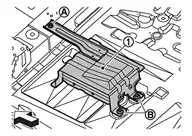
Disconnect the around view monitor control unit harness connectors.
INSTALLATION
Installation is the reverse order of removal.
Was this page helpful?