Simplified Confirmation by Birds-Eye View Screen
Work Procedure
If the front grille upper is removed or replaced, perform the simplified confirmation by birds-eye view screen.
TAKE A SCREENSHOT OF THE BIRDS-EYE VIEW SCREEN 1
Draw white lines with a width of 10 cm (3.9 in) or more as shown in the figure and place the vehicle.


White lines
[10 cm (3.9 in) or more in width]A : 2 m (78.7 in) B : 3 m (118.1 in) Activate the around view monitor and display the birds-eye view screen.
Take a screenshot of the birds-eye view screen in the state shown in the figure.

Insert the USB memory into the USB port.
While pressing the camera switch, quickly turn the volume dial 3 clicks in the order of right→left→right (switches to system diagnostic mode).
Select “Display Diagnosis”.
Select “Screenshot to USB” and turn ON the screenshot.
Display the birds-eye view screen.
Press the camera switch.
Wait at least 10 seconds until the data is written to the USB memory.
GO TO 2.
REMOVAL OR REPLACEMENT OF FRONT GRILL UPPER
Remove or replace the front grill upper. Refer to Removal and Installation.
>>GO TO 3.
TAKE A SCREENSHOT OF THE BIRDS-EYE VIEW SCREEN 2
Take a screenshot of the birds-eye view screen again in the state of the figure.
GO TO 4.
SCREENSHOT COMPARISON OF BIRDS-EYE VIEW SCREEN
Compare the screenshots of the birds-eye view screen before and after removing or replacing the front grill upper, and check if the white lines in the figure is misaligned.
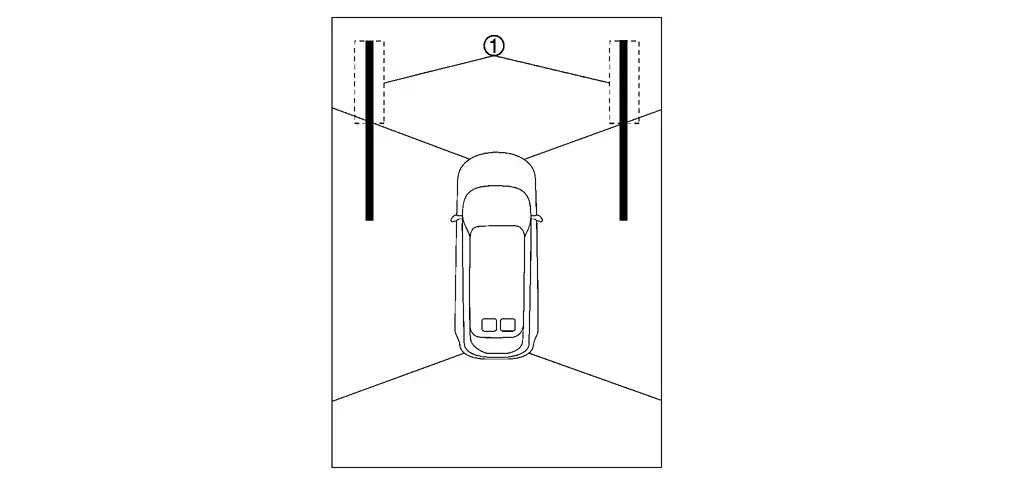
Is there a gap in the white lines?
YES>>Perform camera calibration. Refer to Work Procedure.
NO>>WORK END