Practical advice
Battery replacement
In this manual: Practical advice
~1min read
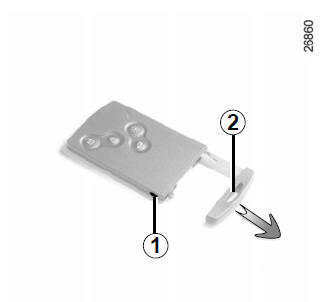
When the message "CARD BATTERY TO BE REPLACED" appears on the instrument panel, replace the RENAULT card battery: press button 1, pulling on the spare key 2, then unclip cover 3 using tab 4.
Remove the battery by pressing on one side (movement A) and lifting on the other side (movement B), then fit a new one, observing the polarity and the model marked on cover 3.
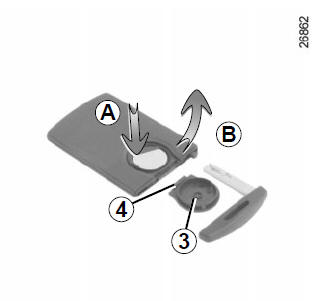
After fitting the battery, carry out the steps in reverse order, then, near the vehicle, press one of the card buttons four times. The message will disappear at the next start-up.
Warning: when replacing the battery, do not touch the electronic circuit or the contacts on the RENAULT card.
Make sure the cover is correctly clipped on.
Batteries are available from an authorised dealer. Their service life is approximately two years. Check that there are no ink marks on the battery: they can cause poor electrical contact.Test yourself
A quick Renault Clio quiz: every answer comes with an explanation and a link to the manual page.
Was this page helpful?