Starting the engine
RENAULT remote-control card
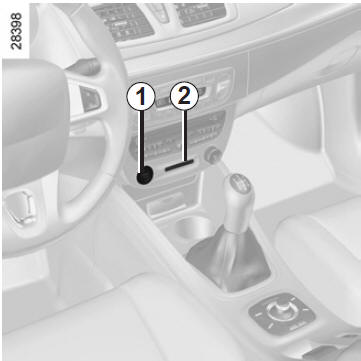
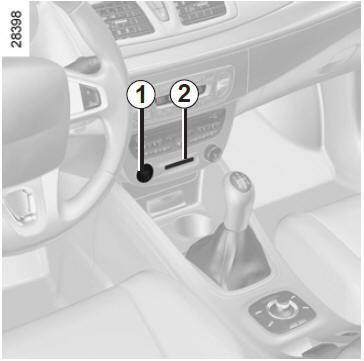
When you get into the vehicle, insert the RENAULT card fully into card reader 2.
To start, press button 1.
If a gear is engaged, press the clutch pedal until the engine starts.
RENAULT "hands-free" card
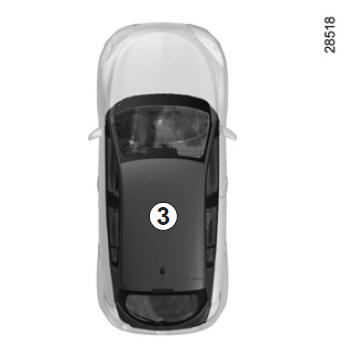
The RENAULT card must be in card reader 2 or in detection zone 3.
To start, press the brake or clutch pedal and press button 1. If a gear is engaged, only pressing the clutch pedal will start the engine.
Starting
vehicles with automatic gearbox
The selector lever must be in P.
For all vehicles:
- if one of the starting conditions is not met, the message "press brake + start" or "depress clutch + start" or "select P" is displayed on the instrument panel.
- In some cases, it will be necessary to turn the steering wheel while pressing the start button 1 to help unlock the steering column. The message "turn steering wheel + start" will alert you to this.
Starting with boot open (hands-free mode)
In this case, the RENAULT card must not be in the boot.
Accessory function (ignition on)
As soon as you access your vehicle, some features are available (radio, navigation, wipers...).
To use the other functions, press button 1 without pressing the pedals.
Note: depending on the vehicle, pressing button 1 starts the engine.
 Never leave your vehicle with the RENAULT card in the card reader and a child (or animal) inside, even for a short time.
This is because they could endanger themselves or others by starting the engine.
Risk of serious injuryMalfunction
In some cases, the RENAULT "hands-free" card may not work:
- wear of the RENAULT card battery, discharged vehicle battery...
- close to a device operating on the same frequency (screen, mobile phone, video games...);
- vehicle located in an area with strong electromagnetic radiation.
The message "insert card" appears on the instrument panel.
Insert the RENAULT card fully into card reader 2.
Test yourself
A quick Renault Megane quiz: every answer comes with an explanation and a link to the manual page.