Speed limiter / Cruise control
The speed limiter is a function that helps you not to exceed a driving speed that you have chosen, called the limited speed.
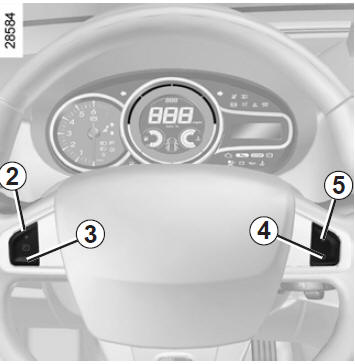
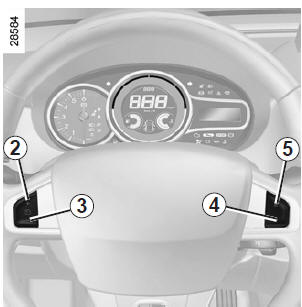
Controls
- Main ON/OFF switch.
- Activation, memorising and incremental increase of the limited speed (+).
- Decremental change of the limited speed (-).
- Standby of the function (with memorising of the limited speed) (O).
- Activation with recall of the memorised limited speed (R).
Activation
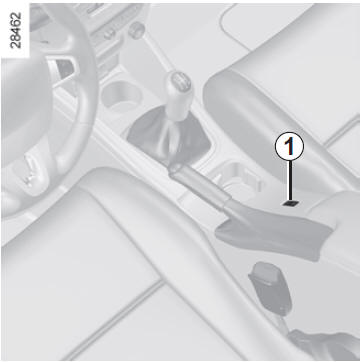
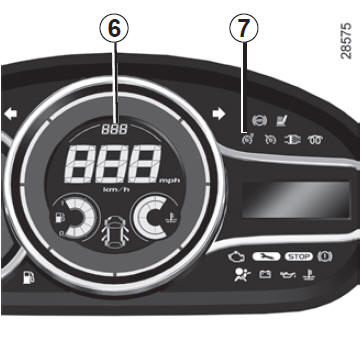
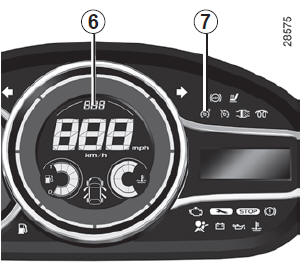
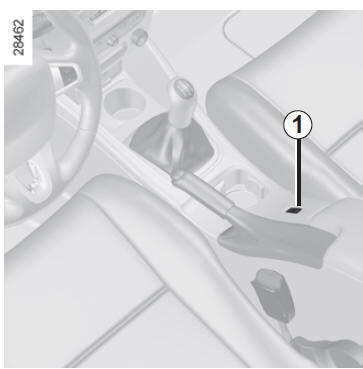
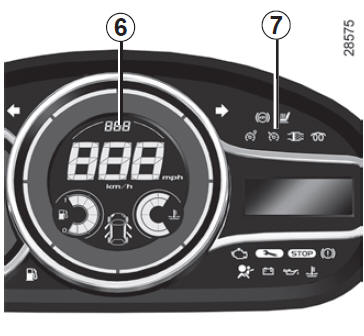
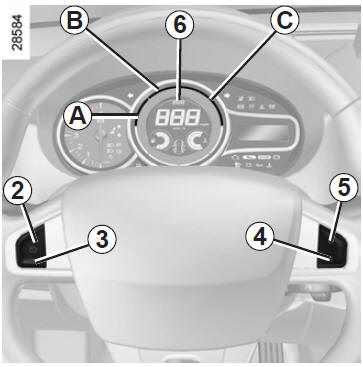
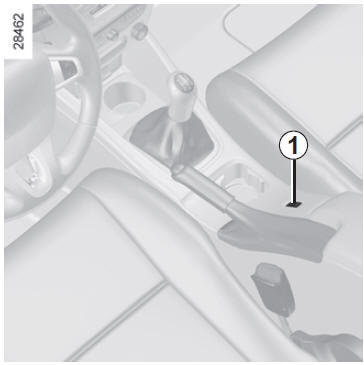
Press switch 1 on the side . Indicator 7 lights up orange, and the message "limiter" appears on the instrument panel with dashes in zone 6 to indicate that the speed limiter function is active and waiting for a limit speed to be stored.
To store the current speed, press switch 2 (+): the limited speed then appears in zone 6. The minimum speed that can be stored is 30 km/h.
Driving
When a speed limit is stored, until that speed is reached, driving is similar to driving a vehicle without a speed limiter.
Once the stored speed is reached, pressing the accelerator pedal will not exceed the set speed unless necessary (see section "Exceeding the limited speed").
Changing the limited speed
You can change the limited speed by pressing the following switches in turn:
- Switch 2 (+) to increase speed;
- Switch 3 (-) to decrease speed.
 The speed limiter function does not act on the braking system under any circumstances.
Exceeding the limited speed
You can exceed the limited speed at any time by pressing the accelerator pedal firmly to the floor (past the "kickdown" point).
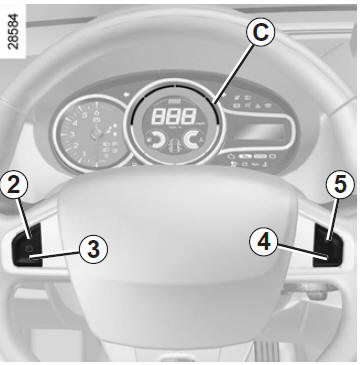
During overtaking, the limited speed flashes on the instrument panel, with zone C lighting up red.
Then, if possible, release the accelerator pedal: the speed limiter function resumes as soon as you reach a speed below the stored speed.
Function unable to maintain the limited speed
On a steep downhill, the limited speed cannot be maintained by the system: the stored speed flashes on the instrument panel, with zone C lighting up red to inform you.
Standby mode
The speed limiter function is suspended when you operate switch 4 (O). In this case, the limited speed remains stored, it is no longer displayed in zone 6, and the message "in memory" with the stored speed appears on the display.
Recalling the limited speed
If a speed is stored, it can be recalled by pressing control 5 (R).
When the limiter is on standby, pressing switch 2 (+) reactivates the function regardless of the stored speed: the vehicle's current speed is taken into account.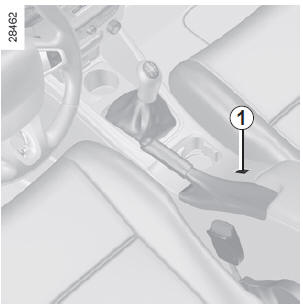
Cancelling the function
The speed limiter function is cancelled when you operate switch 1; in this case there is no stored speed. Extinguishing of orange indicator 7 on the instrument panel confirms that the function has stopped.
Cruise control is a function that helps you maintain your driving speed at a constant value that you have chosen, called the set speed.
This set speed can be continuously adjusted from 30 km/h.
 The cruise control function does not act on the braking system under any circumstances.This function is an additional driving aid. However, it does not take over from the driver. It therefore cannot, under any circumstances, replace compliance with speed limits, attentiveness (always be ready to brake in all circumstances), or the driver's responsibility.
Do not use cruise control in heavy traffic, on winding or slippery roads (ice, aquaplaning, loose gravel), or in adverse weather conditions (fog, rain, crosswinds, etc.).
Risk of accident.
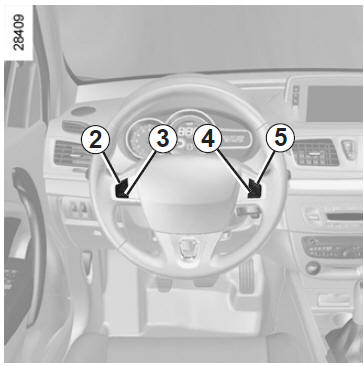
Controls
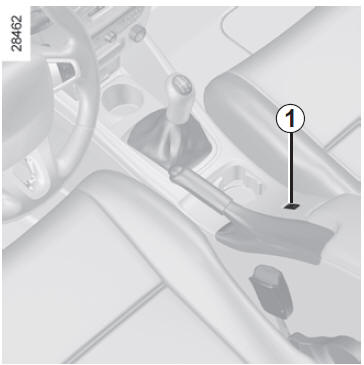
- Main on/off switch.
- Activation, memorising and incremental increase of the set speed (+).
- Decremental change of the set speed (-).
- Putting the function on standby (with storage of the cruise speed) (o).
- Activation with recall of the stored cruise speed (r).
Activation
Press switch 1 on the side .
Indicator 7 lights up green, and the message "cruise control" appears on the instrument panel with dashes in zone 6 to indicate that the cruise control function is active and waiting for a cruise speed to be stored.
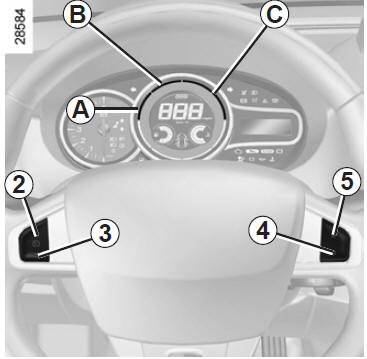
Activating cruise control
At a steady speed (above approximately 30 km/h), press switch 2 (+): the function is activated and the speed is stored. The cruise speed then appears in zone 6.
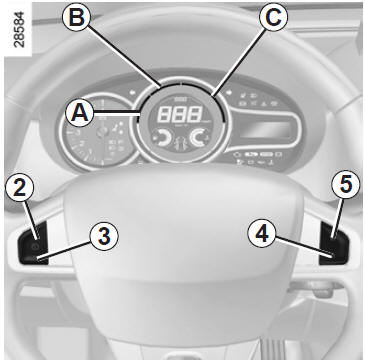
Cruise control engagement is confirmed by zone A lighting up green in addition to indicator 7. Zone B also lights up green to indicate that the cruise speed has been reached.
Driving
Once a set speed is stored and cruise control is activated, you may take your foot off the accelerator pedal.
 Warning: however, it is advisable to keep your feet near the pedals so you are ready to act in an emergency.
Changing the set speed
You can change the cruise control speed by repeatedly pressing:
- switch 2 (+) to increase the speed,
- switch 3 (-) to decrease the speed.
 The cruise control function does not act on the braking system under any circumstances.
Exceeding the cruise control speed
At any time, you can exceed the cruise speed by pressing the accelerator pedal. During overtaking, the cruise speed flashes on the instrument panel, with zone C lighting up red.
Then release the accelerator pedal: after a few seconds, the vehicle automatically resumes the original set speed.
Cruise control unable to maintain the speed
On a steep downhill, the cruise speed cannot be maintained by the system: the stored speed flashes on the instrument panel, with zone C lighting up red to inform you.
Standby mode
The function is suspended when you press:
- control 4 (O);
- the brake pedal;
- the clutch pedal, or shifting to neutral for vehicles with an automatic gearbox.
In all three cases, the cruise speed remains stored, it is no longer displayed in zone 6, and the message "in memory" with the stored speed appears on the instrument panel.
Standby is confirmed by zones A, B and C going out.
Resuming the cruise control speed
If a speed is stored, it can be recalled after making sure that traffic and road conditions are suitable (traffic, road surface, weather conditions, etc.).
Press switch 5 (R) if the vehicle speed is above 30 km/h.
When the stored speed is recalled, zone A lights up to confirm that cruise control is engaged. Zone B lights up as soon as the cruise speed is reached.
Note: if the previously stored speed is much higher than the current speed, the vehicle will accelerate sharply up to that speed.
When the cruise control function is on standby, pressing switch 2 (+) reactivates the cruise control function regardless of the stored speed: the vehicle's current speed is taken into account.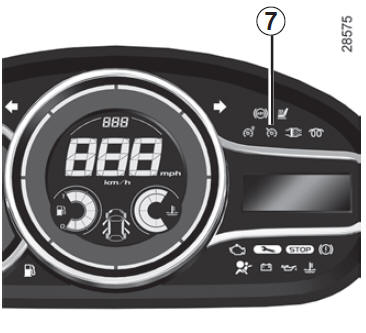
Cancelling the function
The cruise control function is cancelled when you operate switch 1; in this case there is no stored speed. Extinguishing of green indicator 7 and zones A, B and C on the instrument panel confirms that the function has stopped.
 Putting the cruise control on standby or switching it off does not cause a rapid reduction in speed: you must brake by pressing the brake pedal.
Test yourself
A quick Renault Megane quiz: every answer comes with an explanation and a link to the manual page.