LCD Modes
Shift to P to change settings
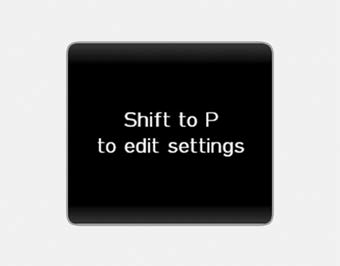
This warning message appears if you try to select other user settings items while driving.
For safety, change the user settings after parking the vehicle and moving the shift lever to the P (Park) position.
Quick Reference (Help, if equipped)
Press and hold the OK button in User Settings Mode to display an explanation of the selected item.
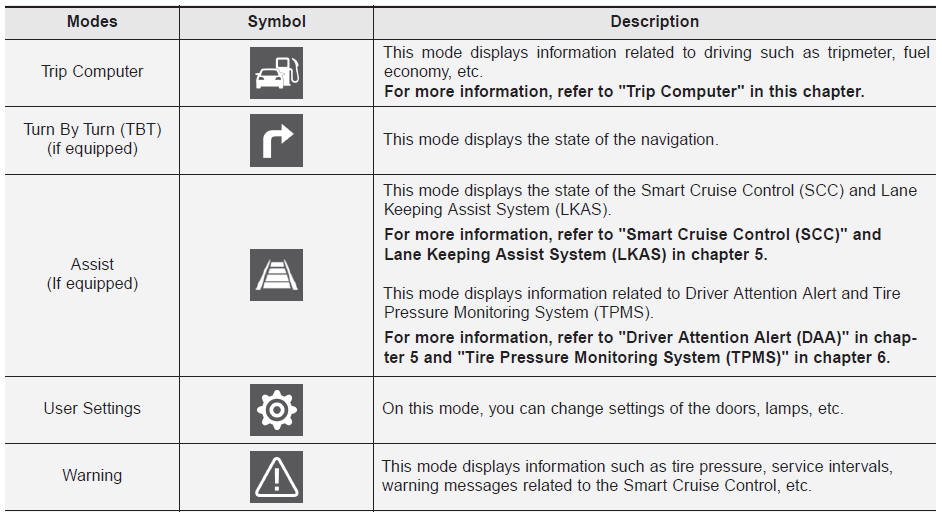
Trip Computer Mode
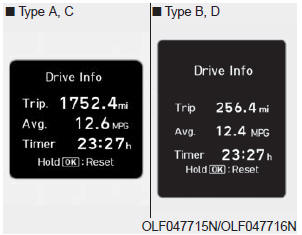
This mode displays driving information, such as the trip odometer, fuel consumption, and so on.
Turn-by-Turn Mode (TBT)
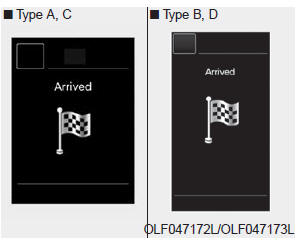
This mode displays the navigation status.
Assist Mode

SCC/LKAS/DAA
This mode displays the status of Smart Cruise Control (SCC), Lane Keeping Assist System (LKAS), and Driver Attention Alert (DAA).
Tire Pressure

This mode displays the tire pressure information.
Warning Message Mode
If one of the following events occurs, warning messages will be displayed on the information display mode for several seconds.
- Malfunction of the following systems
- Smart Cruise Control (SCC)
- Blind-Spot Detection (BSD)
- Tire Pressure Monitoring System (TPMS)
- Autonomous Emergency Braking (AEB) System
- High Beam Assist (HBA) System
User Settings Mode
In this mode, you can change the settings of the instrument cluster, doors, lights, etc.
1. Driving Assist
2. Door
3. Light
4. Sound
5. Convenience
6. Service Interval
7. Other Features
8. Reset
1. Driving Assist
• LKAS (Lane Keeping Assist System)
- Lane Departure Warning / Standard LKA / Active LKA
To adjust the sensitivity of the Lane Keeping Assist system.
• DAA (Driver Attention Alert)
Adjusts the sensitivity of the Driver Attention Alert (DAA) system.
- Off / Normal / Early
• SCC Response (Smart Cruise Control)
- Slow/Normal/Fast
To adjust the sensitivity of the Smart Cruise Control system.
• AEB (Autonomous Emergency Braking)
To activate or deactivate the Autonomous Emergency Braking (AEB) system.
• FCW (Forward Collision Warning)
- Late/Normal/Early
Adjusts the initial warning timing for the Autonomous Emergency Braking system.
• BSD Sound (Blind-Spot Detection)
To activate or deactivate the Blind-Spot Detection warning sound.
• RCTA (Rear Cross-Traffic Alert)
To activate or deactivate the Rear Cross-Traffic Alert system.
2. Door
• Auto Lock
- Off: Auto door lock operation will be cancelled.
- Vehicle Speed: All doors will automatically lock when the vehicle speed exceeds 15 km/h.
- Shift Lever: All doors will automatically lock when the automatic transmission shift lever is moved from P (Park) to R (Reverse), N (Neutral), or D (Drive).
• Auto Unlock
- Off: Auto door unlock operation will be cancelled.
- Ignition Off: All doors will automatically unlock when the engine start/stop button is set to OFF. (with Smart Key)
- Key Removal: All doors will automatically unlock when the ignition key is removed from the ignition switch. (with remote key)
- Driver's Door Unlock: All doors will automatically unlock when the driver's door is opened.
- Shift to P: All doors will automatically unlock when the automatic transmission shift lever is moved to P (Park).
• Smart Trunk
To activate or deactivate the Smart Trunk system.
For more information, refer to "Smart Trunk" in this chapter.
3. Light
• One-Touch Turn Signal
- Off: One-touch turn signal function will be disabled.
- 3, 5, 7 Flashes: The turn signal indicator will flash 3, 5, or 7 times when the turn signal lever is moved slightly.
• Headlamp Delay
To activate or deactivate the headlamp delay function.
• Welcome Light
To activate or deactivate the welcome light function.
4. Sound
• Parking Assist Volume
- Softer/Louder
To adjust the volume of the parking assist system.
• Welcome Sound
To activate or deactivate the welcome sound.
5. Convenience
• Easy Access Seat
- Off: Easy Access to the seat is disabled.
- Normal/Extended: When the engine is turned off, the driver's seat automatically moves rearward by a short (normal) or long (extended) distance so that you can enter or exit the vehicle more easily.
• Wireless Charging System
To activate or deactivate the front seat wireless charging system.
• Wiper/Light Display
To activate or deactivate the Wiper/Light mode.
When activated, the LCD display shows the selected wiper/light mode whenever you change the mode.
• Shift Position Pop-up
To activate or deactivate the shift position pop-up.
When activated, the shift position will be displayed on the LCD display.
6. Service Interval
• Service Interval Enabled
To activate or deactivate the service interval function.
• Set Interval
If the service interval menu is activated, you can set the time and distance.
Information
To use the service interval menu, contact an authorized HYUNDAI dealer.
If the service interval is activated and the time and distance are set, messages appear in the following situations each time the vehicle is started.
- Service In
: Displayed to inform the driver of the remaining distance and number of days until service.
- Service Required
: Displayed when the distance and days until service have been reached or exceeded.
Information
If any of the following conditions occur, the distance and number of days until service may be incorrect.
- Battery cable disconnected.
- Fuse switch turned off.
- Battery discharged.
7. Other Functions
• Fuel Economy Auto Reset
- Off: Average fuel economy is not reset automatically when refueling.
- After Ignition On: Average fuel economy is reset automatically whenever 4 hours have passed after the engine is turned off.
- After Recharging: Average fuel economy is reset automatically when refueling.
• Fuel Economy Unit
Selects the fuel economy unit. (km/L, L/100, MPG)
• Temperature Unit
Temperature unit selection (°C, °F)
• Tire pressure monitor
Tire pressure unit selection (psi, kPa, bar)
8. Reset
You can reset the menu in the User Settings mode. All menus in the User Settings mode will be initialized, except the language and service interval.
Test yourself
A quick Hyundai Sonata LF quiz: every answer comes with an explanation and a link to the manual page.