Vehicle Recognition

Some vehicles in your lane cannot be detected by the radar:
- Narrow vehicles such as motorcycles or bicycles
- Vehicles offset to one side
- Slow-moving vehicles or vehicles that decelerate suddenly
- Stopped vehicles
- Vehicles with a small rear profile, such as unloaded trailers
The vehicle ahead cannot be correctly detected by the radar in the following cases:
- When the vehicle is tilted nose-up due to heavy cargo in the luggage compartment
- While the steering wheel is being operated
- When driving on one side of the lane
- When driving on narrow lanes or on curves
Press the brake or accelerator pedal as necessary.

- Your vehicle may accelerate when the vehicle ahead of you moves out of the way.
- When you are warned that a vehicle ahead is not detected, drive with caution.
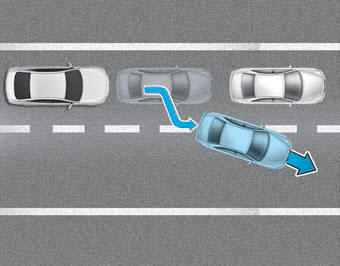
- When your vehicle is stopped and the vehicle ahead changes to the next lane, be careful when your vehicle starts moving, because it may not detect the stopped vehicle in front of you.
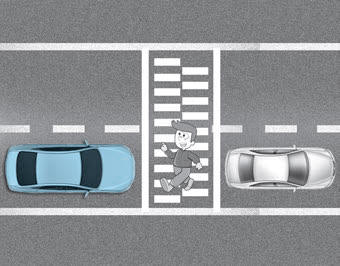
- Always watch for pedestrians when your vehicle is maintaining a distance from the vehicle ahead.

- Always be careful with taller vehicles or vehicles carrying loads that extend beyond the rear of the vehicle.
WARNING
When using Smart Cruise Control, observe the following precautions:
- If emergency stopping is required, you must apply the brakes. The vehicle cannot be stopped using Smart Cruise Control.
- Maintain a safe distance depending on road conditions and vehicle speed. If the distance between vehicles is too small while driving at high speed, a serious collision may occur.
- Always maintain a sufficient braking distance and reduce vehicle speed by applying the brakes when necessary.
- The Smart Cruise Control system cannot detect a stopped vehicle, pedestrians, or oncoming vehicles. Always watch the road ahead carefully to prevent sudden and unexpected situations.
- Vehicles moving in front of you with frequent lane changes may cause a delayed system response, or may cause the system to respond to a vehicle that is actually in an adjacent lane. Always drive carefully to prevent unexpected and sudden situations from occurring.
- Always monitor the set speed and the distance between vehicles.
- The Smart Cruise Control system may not recognize complex driving situations. Therefore, always pay attention to driving conditions and control your vehicle speed.
NOTICE
The Smart Cruise Control system may temporarily stop operating for the following reasons:
- Electrical interference
- Suspension modification
- Differences in tire wear or tire pressure
- Installation of different types of tires.
Information
This device complies with Part 15 of the FCC Rules.
Operation is subject to the following two conditions:
1. This device may not cause harmful interference, and
2. This device must accept any interference received, including interference that may cause undesired operation.
Changes or modifications not expressly approved by the party responsible for compliance could void the user's authority to operate the equipment.
Information
Radio frequency radiation exposure information:
This equipment complies with FCC radiation exposure limits set forth for an uncontrolled environment.
This equipment must be installed and operated with a minimum distance of 20 cm between the radiator (antenna) and your body.
This transmitter must not be co-located or operated in conjunction with any other antenna or transmitter.
Test yourself
A quick Hyundai Sonata LF quiz: every answer comes with an explanation and a link to the manual page.