AM/FM radio with digital display
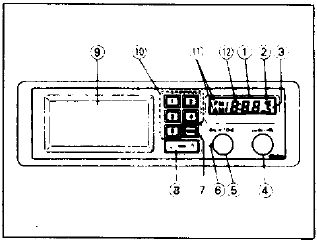
- Digital display
- ST (stereo) indicator
- Preset channel indicator
- Power/volume knob
- Tone adjustment knob
- Channel balance adjustment knob
- AM/FM selector button
- Manual tuning "up/down" (also serves as seek button) and minute adjustment ("
 ") and hour adjustment ("
 ").
- Pocket
- Preset buttons (1 to 5)
- AM/FM indicator
- Digital frequency display
Operating the controls: Power/volume knob
Press the knob to turn on the power.
Press it again to turn off the power.
Turning the knob clockwise increases the volume; turning it counterclockwise decreases it.
Manual tuning/seek button
Pressing the " " side of the button
tunes toward higher frequencies; pressing the "v" side tunes toward lower frequencies. The frequency changes by 9 kHz (AM) or 0.1 MHz (FM) each time the button is pressed. If the button is held down, the frequency changes continuously. Holding the button for more than half a second starts seek tuning automatically.
The frequency increases (or decreases) and stops automatically when a station is received, even if the button is still held. To seek the next station, press the button again. Pressing the button while the radio is seeking stops the search immediately.
Band selector button This button is used to choose between AM and FM. The AM/FM indicator shows which band is currently being received. If a stereo program is received on FM, the ST indicator appears.
Preset buttons
Press one of buttons 1 to 5 to select a previously stored station. The frequency assigned to the pressed button is shown on the digital display.
Tone adjustment knob
Turning the knob clockwise emphasizes high tones; turning it counterclockwise emphasizes bass.
Channel balance adjustment knob
Turning the knob clockwise increases the volume of the right speaker; turning it counterclockwise increases the left speaker.
Storing stations on preset buttons
- Use manual tuning or seek to find the desired station.
- Press and hold one of the preset buttons for about two seconds. When the station is stored, the preset channel number appears on the display.
- Repeat the procedure to store stations on the other channels, or retune the channels that are already stored.
Test yourself
A quick Suzuki Swift quiz: every answer comes with an explanation and a link to the manual page.