Emergency Battery
Components
COMPONENTS
ILLUSTRATION
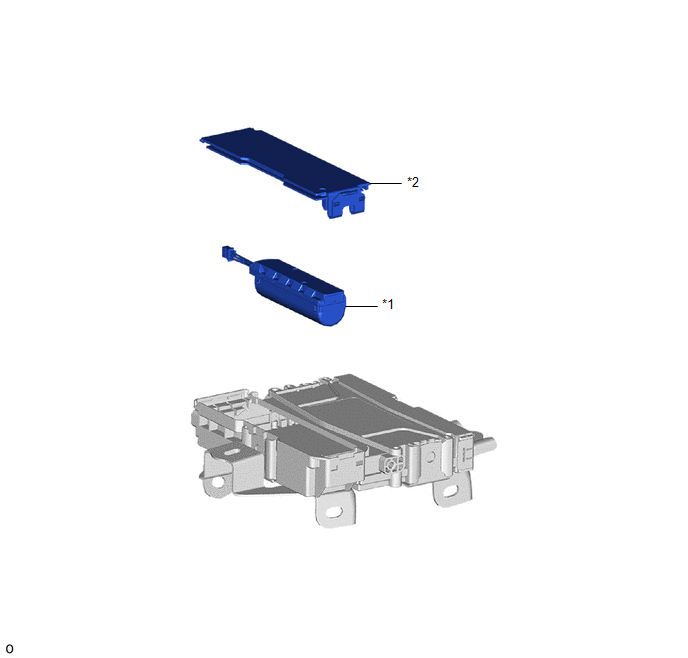
*1 |
CELLULAR PHONE BATTERY |
*2 |
TRANSCEIVER COVER |
Installation
INSTALLATION
PROCEDURE
1. REINSTALL CELLULAR PHONE BATTERY
(a) Reinstall the cellular phone battery.
(b) Connect the connector.
2. REINSTALL TRANSCEIVER COVER
(a) Engage the guides and claws to reinstall the transceiver cover as shown in the illustration.
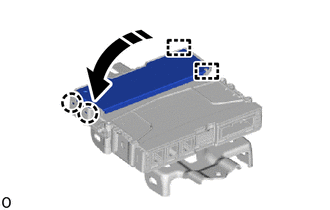
 |
Install in this direction |
3. REINSTALL DCM (TELEMATICS TRANSCEIVER)
Click here
4. PERFORM REGISTRATION
Click here
Removal
REMOVAL
PRECAUTION / NOTICE / HINT
The necessary procedures (adjustment, calibration, initialization or registration) that must be performed after parts are removed, installed or replaced during emergency battery removal/installation are shown below.
Procedures Required After Replacement / Removal / Installation of PartsReplacement part or procedure | Required Procedure | Effect/Inoperative function when procedure not performed | Link |
|---|---|---|---|
Cellular phone battery |
Reset cellular phone battery state |
Secure connection system |
 |
PROCEDURE
1. REMOVE DCM (TELEMATICS TRANSCEIVER)
Click here
2. REMOVE TRANSCEIVER COVER
(a) Release the claws and guides to remove the transceiver cover as shown in the illustration.
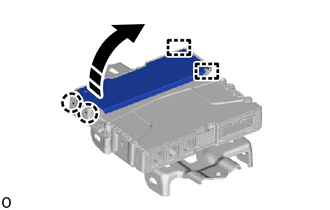
 |
Remove in this direction |
3. REMOVE CELLULAR PHONE BATTERY
(a) Disconnect the connector. |
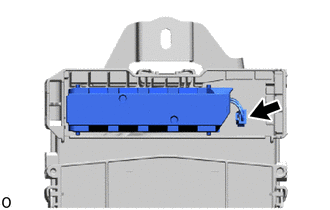 |
(b) Remove the cellular phone battery.