Smart entry & start system
You can perform the following operations simply by carrying the electronic key on you, for example in your pocket. The driver must always keep the electronic key on their person.
- Locking and unlocking the doors
- Locking and unlocking the liftgate
- Starting the engine
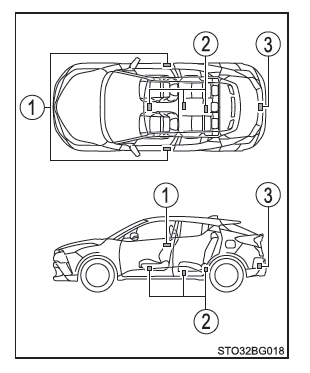
■ Antenna locations
- Antennas located outside the cabin
- Antennas located inside the cabin
- Antenna located outside the luggage compartment
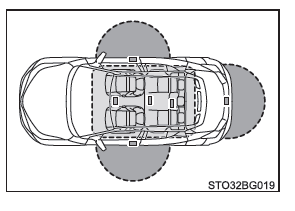
■ Effective range (electronic key detection area)
 When locking or unlocking the doors
The system works when the electronic key is within 0.7 m (2.3 ft.) of a front door outside handle or the liftgate.
(Only the doors that detect the key can be operated.)
 When starting the engine or changing the engine switch mode
The system can be operated when the electronic key is inside the vehicle.
■ Alarms and warning indicators Exterior and interior buzzers are used together with the warning messages shown on the multi-information display to prevent vehicle theft and accidents caused by improper operation. Take the appropriate action according to the message displayed. When only an alarm sounds, the circumstances and corrective procedures are as follows.
| Alarm | Situation | Corrective action |
| The exterior buzzer sounds once for 5 seconds | You tried to lock the vehicle doors while a door was open. | Close and lock all the doors again. |
| The interior buzzer sounds continuously | You switched the engine switch to ACCESSORY mode while the driver's door was open (or opened the driver's door while the engine switch was in ACCESSORY mode). | Turn the engine switch off and close the driver's door. |
■ When the message "Smart entry & start system malfunction. Refer to owner's manual." is shown on the multi-information display The system may be malfunctioning. Have the vehicle inspected as soon as possible by a Toyota dealer, a Toyota-authorized repairer, or any reliable repairer.
■ Battery-saving function The battery-saving function is activated to prevent the electronic key battery from fully wearing out and the vehicle battery from discharging when the vehicle is not used for an extended period.
- In the following cases, the Smart Entry & Start System may take longer to unlock the doors.
- The electronic key has remained approximately 2 m (6 ft.) or more outside the vehicle for 10 minutes or longer.
- The Smart Entry & Start System has not been used for 5 days or more.
- If the Smart Entry & Start System has not been used for 14 days or more, the vehicle cannot be unlocked from a door other than the driver's door. In this case, grasp the driver's door handle, or use the wireless remote control or the mechanical key to unlock the doors.
■ Electronic key battery-saving function When the battery-saving mode is active, the electronic key stops receiving radio waves so that the battery wears down as slowly as possible.
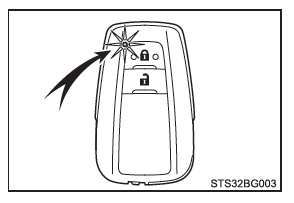
Press twice, and while pressing and holding
 . Confirm that the indicator flashes 4 times on the electronic key.
While the battery-saving mode is active, the Smart Entry & Start System cannot be used. To cancel the function, press any button on the electronic key.
■ Factors affecting operation The Smart Entry & Start System uses low-power radio waves. In the following situations, communication between the electronic key and the vehicle may be disrupted, preventing the Smart Entry & Start System, the wireless remote control and the immobilizer system from operating normally.
- When the electronic key battery is discharged
- When you are near a TV tower, power station, gas station, radio station, large electronic billboard, airport or any other facility that generates strong electromagnetic waves (radio waves or radio noise)
- When you are carrying a radio, mobile phone, cordless phone or any other wireless communication device
- When the electronic key is in contact with or covered by the following metallic objects
- Cards covered with aluminum foil
- Metallic bags or wallets
- Coins
- Metal hand warmers
- CDs, DVDs or any other digital media
- When other wireless remote control keys (that emit radio waves) are used nearby
- When you carry the electronic key together with the following radio wave-emitting devices
- Radio, mobile phone, cordless phone or any other wireless communication device
- Another electronic key or wireless remote control key that emits radio waves
- Computers or personal digital assistants (PDAs)
- Digital audio players
- Portable game consoles
- If a metallic film is applied to the rear window or metal objects are in contact with it
- When the electronic key is placed near a battery charger or electronic devices
- When you park next to a parking meter
■ Note on Smart Entry
- Even if the electronic key is within the effective range (detection area), the system may not operate properly in the following cases:
- The electronic key is too close to the window or the outside door handle, or is near the floor or high up while the doors are locked or unlocked.
- The electronic key is near the floor or high up, or too close to the center of the rear bumper while the luggage compartment is open.
- The electronic key is on the instrument panel, on the parcel shelf, on the floor, in the door pockets or in the glove box when you start the engine or change the start switch mode.
- Do not leave the electronic key on the instrument panel or near the door pockets when leaving the vehicle. Depending on radio wave reception conditions, it may be detected by the antenna outside the passenger compartment, and the door may become lockable from the outside, with the risk of locking the electronic key inside the vehicle.
- As long as the electronic key is within the effective range, anyone can lock or unlock the doors.
- Even if the electronic key is not inside the vehicle, the engine can be started if it is near the window.
- The doors may unlock when the outside door handle receives a large amount of water, for example in rain or when washing the vehicle in an automatic car wash, while the electronic key is within the effective range. (The doors lock automatically after approximately 30 seconds if the doors are not opened or closed.)
- If the remote central locking is used to lock the doors while the electronic key is near the vehicle, the "hands-free" access may not unlock the door. (Use the remote central locking to unlock the doors.)
- Touching the door lock sensor while wearing gloves may delay or prevent locking. Remove your gloves and touch the sensor again with your fingers.
- If the door handle is wet while the electronic key is within the effective range, the doors may repeatedly lock and unlock. In this case, to prevent this, proceed as follows when washing the vehicle:
- Keep the electronic key more than 2 m (6 ft.) away from the vehicle. (Take care that the key is not stolen.)
- Activate the battery saving mode on the electronic key to deactivate the "hands-free" access and starting system.
- If the electronic key is inside the vehicle while a door handle is wet during washing, a message may appear on the multi-information display and a warning tone may sound outside the vehicle.
To stop the alarm, lock all the doors.
- The door lock sensor may not operate normally if it is covered with ice, snow, mud, etc. Clean the door lock sensor and try to operate it again.
- If you suddenly approach the vehicle and pull the door handle abruptly, the door may not unlock. In this case, return the door handle to its original position and check that the doors are unlocked before pulling the door handle again.
- If another electronic key is within the detection area, unlocking the doors may take longer after you grip the door handle.
- When using the door handle, your fingernails may rub against the door. Take care not to break a nail or damage the door surface.
■ When the vehicle is not used for an extended period
- To prevent vehicle theft, do not leave the electronic key within 2 m (6 ft.) of the vehicle.
- It is possible to deactivate the "hands-free" access and starting system in advance.
■ To operate the system correctly Make sure to carry the electronic key on you when operating the system. Do not bring the electronic key too close to the vehicle when operating the system from outside the vehicle.
Depending on the position of the electronic key and how you hold it, the key may not be detected correctly and the system may not operate properly. (The alarm may trigger accidentally, or the anti-lockout function may not work.)
■ If the "hands-free" access and starting system does not operate normally
- Locking and unlocking the doors: Use the conventional key.
- Starting the engine
■ Personalization The settings of certain functions can be changed (e.g. the "hands-free" access and starting system).
■ If the "hands-free" access and starting system has been deactivated through personalization
- Locking and unlocking the doors: Use the remote central locking or the conventional key.
- Starting the engine and changing the start switch mode:.
- Stopping the engine.
■ Warning concerning interference with electronic devices
- People with a cardiac implant (implantable pacemaker, cardiac resynchronization therapy device or implantable cardioverter-defibrillator) should keep a reasonable distance from the antennas of the "hands-free" access and starting system. Radio waves may interfere with the operation of this type of device. If necessary, the "hands-free" access function can be deactivated.
Consult a Toyota dealer, a Toyota-authorized repairer, or any reliable repairer for details, including the frequency and transmission interval of the radio waves. Then consult your doctor to determine whether it is preferable to deactivate the "hands-free" access.
- Users with an electrical medical implant other than a cardiac device (implantable pacemaker, cardiac resynchronization therapy device, or implantable cardioverter defibrillator) are asked to check with the implant manufacturer about how it operates in the presence of radio waves.
Radio waves may have unexpected effects on the operation of these medical implants.
Consult a Toyota dealer, a Toyota-authorized repairer, or any reliable repairer for details on deactivating the hands-free access.