Automatic Air Conditioning System
The air outlet selection and fan speed are automatically controlled according to the temperature setting.
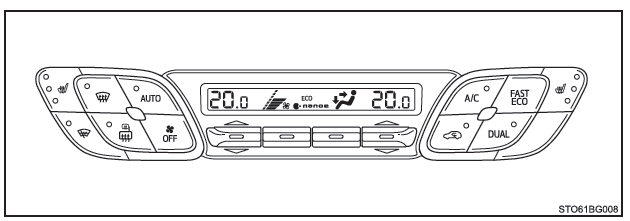
Air conditioning controls
The illustrations below show left-hand drive vehicles.
The buttons have a different shape and are positioned differently on right-hand drive vehicles.
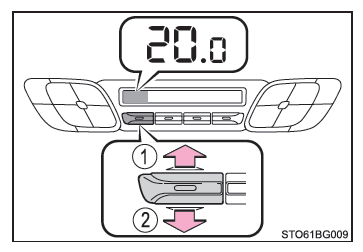
■ Changing the temperature setting
- Increasing the temperature
- Decreasing the temperature
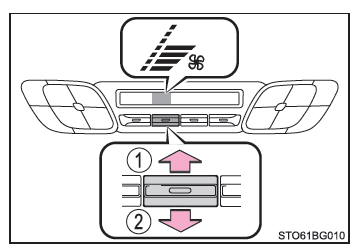
■ Adjusting the fan speed
- Increasing the fan speed
- Decreasing the fan speed
Press to turn off the fan.
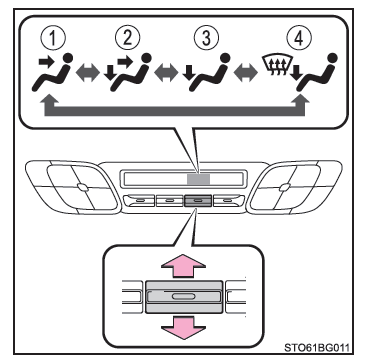
■ Selecting the airflow mode To select the airflow mode, press the airflow button up or down.
Each time you press the button, the system selects the outlets in use in turn.
- Air is directed to the upper body.
- Air is directed to the upper body and feet.
- Air is directed to the feet.
- Air is directed to the feet and the windshield defogger is on.
Using Automatic Mode
1. Press the .
The dehumidification system turns on. The air outlet selection and fan speed are automatically controlled according to the temperature setting.
2. Adjust the temperature setting.
3. To stop operation, press .
■ Automatic mode indicator If you adjust the fan speed or the air outlet selection, the automatic mode indicator turns off. However, automatic mode is maintained for all other functions that you did not adjust.
■ Separate temperature settings for driver and front passenger seats To activate dual mode, use one of the following procedures:
- Press
 .
- Adjust the temperature setting on the front passenger side.
The indicator comes on when dual mode is active.
Other functions
■ Selecting outside air and recirculation modes
Press .
Each time you press the button, the system selects outside air mode (indicator off) and recirculation mode (indicator on) in turn. .
■ Defogging the windshield The defoggers are used to defog the windshield and the front side windows.
Press .
The dehumidifying function is active and the fan speed increases.
If the system is in recirculation mode, set the outside air/recirculation button to outside air mode. (The switch may be automatic.) To defog the windshield and front side windows more quickly, set the fan to a high speed and the temperature to warm.
To return to the previous mode, press again once the windshield has defogged.
■ Defogging the rear window and outside rear view mirrors The vehicle is equipped with defoggers to defog the rear window and clear the outside rear view mirrors of rain, dew and fog.
Press .
The defoggers turn off automatically after a certain time.
■ Windshield wiper de-icer (on models equipped with one) This function prevents the windshield and wiper blades from icing over.
Press .
The windshield wiper de-icer turns off automatically after a certain time.
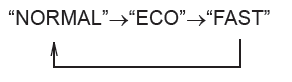
■ Customizing the fan speed You can change the fan speed settings.
1. Press the .
2. Press .
3. Each time you press , the system selects the fan speeds in sequence as follows.
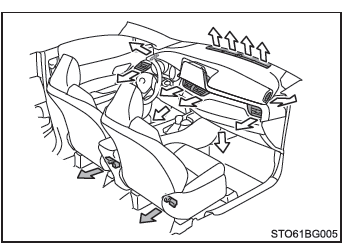
Air vents
■ Location of the air outlets The air outlets used and the airflow vary depending on the air outlet mode selected.
 : Some models
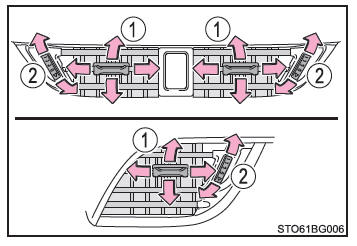
■ Direction and opening/closing of the air vents
- Direct the airflow to the left or right, or up or down.
- Turn the knob to open or close the air vent.
■ Using automatic mode The fan speed is automatically controlled according to the temperature setting and ambient conditions.
Therefore, immediately after you press , the fan may stop for a few minutes until the air being blown is sufficiently warm or cool.
■ Fogging on the windows
- The windows easily fog up when humidity inside the vehicle is high. Set
 on to dehumidify the air from the air vents and effectively defog the windshield.
- If you turn
 off, the windows may fog up more easily.
- Windows tend to fog up more easily when recirculation mode is used.
■ Outside air/recirculation mode
- When driving on a dusty road, in a tunnel or in heavy traffic, set the outside air/recirculation button to recirculation. This is an effective way to prevent outside air from entering the vehicle cabin. When the air conditioning is set to cool, selecting recirculation mode also cools the vehicle cabin effectively.
- Switching between outside air mode and recirculation mode may be automatic, depending on the temperature setting or the interior temperature.
■ Using the air conditioning system in Eco mode
- In Eco mode, the air conditioning system is controlled as follows to give priority to fuel economy:
- Control of engine speed and compressor engagement to limit heating/cooling output
- Limitation of fan speed when automatic mode is selected
- To make the air conditioning more effective, perform the following operations:
- Adjust the fan speed
- Change the temperature setting
- Turn off Eco mode
- Even when you have selected the Eco driving mode, you can turn off the air conditioning Eco mode by pressing
 .
■ When the outside temperature is close to 0°C (32°F) The dehumidifying function may not work, even after you press .
■ Odors from the ventilation and air conditioning system
- To let in fresh air, set the air conditioning system to outside air mode.
- During use, various odors from inside or outside the vehicle may enter and build up in the air conditioning system. These odors may then be released through the air vents.
- To limit the possible occurrence of odors:
- It is recommended to set the air conditioning system to outside air mode before stopping the vehicle.
- The fan may start only a few moments after the air conditioning system starts in automatic mode.
■ nanoe*1 (on models equipped with one) The air conditioning system uses nanoe technology. This system cools the air by releasing water particles charged with nanoe ions into the cabin through the front passenger's side air outlets*2.
- When the fan is operating, the nanoe system is activated.
- The system performs at its best when you use the fan under the following conditions. If the following conditions are not met, the nanoe system may not reach its full effect.
- You are using the upper body air outlets, the upper body and foot air outlets, or the foot air outlets.
- The front passenger's side air outlet is open.
- When the nanoe system is active, it releases a small amount of ozone, which may have a noticeable odor in some situations. However, this amount is very close to what already exists in nature, such as in forests, and therefore has no effect on the human body.
- A slight noise may be audible during operation. This is not a malfunction.
*1: nanoe and the nanoe logo are trademarks of Panasonic Corporation.
*2: Depending on temperature and humidity conditions, fan speed and air outlet selection, the nanoe system may not produce its full effect.
■ Air conditioning filter
■ Customization The settings of certain functions can be changed (e.g., the air conditioning function).
WARNING■ To prevent the windshield from fogging up
- Do not use
 in extremely humid weather with the air conditioning set to cool. The difference in temperature between the outside air and the windshield causes fog to form on the outside of the windshield, which reduces your visibility.
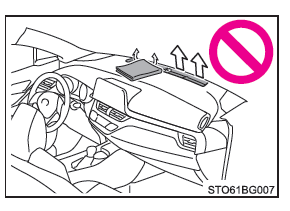
- Do not place anything on the instrument panel that could block the air vents. Otherwise, the air vents may be blocked, preventing the windshield defoggers from working properly.
■ To prevent burns
Do not touch the outside rear view mirror glass while the defoggers are operating.
Vehicles equipped with a windshield wiper de-icer: Do not touch the lower part of the windshield glass or the sides of the front pillars while the windshield wiper de-icer is operating.
■ nanoe generator (on equipped models) Do not disassemble or attempt to repair the generator, as it contains high-voltage components.
If the generator requires repair, contact a Toyota dealer, a Toyota-approved repairer, or any reliable repairer.
NOTE■ To prevent battery discharge Do not run the air conditioning system longer than necessary when the engine is off.
■ To prevent damage to the nanoe system (on equipped models) Do not insert or attach anything to the driver's side vent, and do not spray any product into it. Doing so may prevent the generator from operating normally.