Wireless remote control
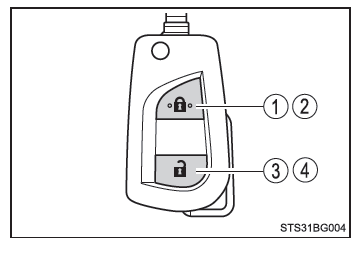
Vehicles without a smart entry & start system
- Locking all doors
- Closing the windows*
- Unlocking all doors
- Opening the windows*
*: These settings must be customized by a Toyota dealer, a Toyota-authorized repairer, or any reliable repairer.
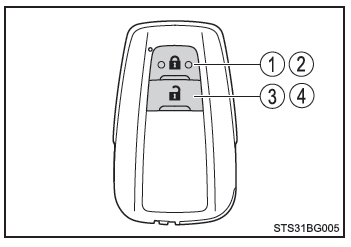
Vehicles with a smart entry & start system
- Locking all doors
- Closing the windows*
- Unlocking all doors
- Opening the windows*
*: These settings must be customized by a Toyota dealer, a Toyota-authorized repairer, or any reliable repairer.
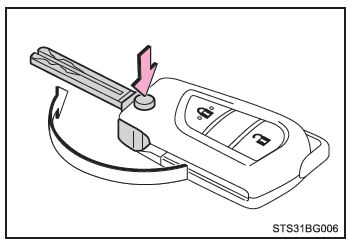
Using the key (vehicles without a smart entry & start system)
Press the button to release the key.
To retract it, press the button and fold the key.
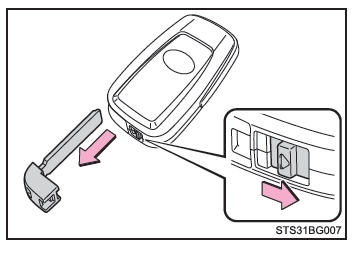
Using the mechanical key (vehicles with a smart entry & start system)
To remove the mechanical key, slide the release button, then pull the key out.
The mechanical key can only be inserted one way, as it has grooves on one side only.
If the key cannot be inserted into the lock, turn it over and try again.
After using the mechanical key, put it back into the electronic key. The mechanical key must always be kept with the electronic key. If the electronic key battery is discharged or the smart entry function does not operate properly, use the mechanical key.
■ If you lose your keys A Toyota dealer, a Toyota-authorized repairer, or any reliable repairer can make new genuine keys, provided you supply the other key (vehicles without a smart entry & start system) or the mechanical key (vehicles with a smart entry & start system) and the number engraved on the key number tag that comes with it. Keep this tag in a safe place, such as in your wallet, and not in the vehicle.
■ Air travel When boarding an aircraft with a key that has a wireless remote control function, take care not to press any of its buttons while you are in the cabin. If you carry the key in a bag, etc., make sure the buttons cannot be pressed accidentally. Pressing any button on the key may emit radio waves that could interfere with the operation of the aircraft.
■ Conditions affecting the operation of the smart entry & start system or the wireless remote control
Vehicles without a smart entry & start system
The wireless remote control function may not operate normally in the following situations:
- When the battery of the wireless remote control key is depleted
- Near a television antenna relay, radio station, power plant, airport, or any other location that generates strong radio waves
- When you are carrying a portable radio, mobile phone, or any other wireless communication device
- When several wireless remote control keys are close together
- When the wireless remote control key is in contact with or covered by a metal object
- When a wireless remote control key (emitting radio waves) is being used nearby
- When the wireless remote control key is left near an electrical device, such as a personal computer
- If a metallic film is applied to the rear window or metal objects are in contact with it
Vehicles with a smart entry & start system
■ Key battery discharge
Vehicles without a smart entry & start system
If the wireless remote control does not operate, the battery may be depleted. Replace the battery when necessary.
Vehicles with a smart entry & start system
- The battery has a normal service life of 1 to 2 years.
- When the battery is depleted, a buzzer sounds inside the cabin when the engine is switched off.
- The battery discharges even when the electronic key is not used, because the key continuously receives radio waves. The following symptoms indicate that the electronic key battery may be depleted. Replace the battery when necessary.
- The smart entry & start system or the wireless remote control does not operate.
- The detection area becomes smaller.
- The key indicator light does not illuminate.
- The owner can replace the battery. However, since there is a risk of damaging the key during replacement, it is recommended that the battery be replaced by a Toyota dealer, a Toyota-authorized repairer, or any reliable repairer.
- To prevent serious damage, do not leave the electronic key within 1 m (3 ft.) of the following electrical devices, which generate a magnetic field:
- Television sets
- Personal computers
- Mobile phones, cordless phones, and battery chargers
- Mobile or cordless phones while charging
- Desk lamps
- Induction cooktops
■ If the electronic key battery is completely discharged
■ Checking the number of registered keys (vehicles with a "smart entry & start" system) It is possible to check the number of keys already registered. Contact a Toyota dealer, an authorized Toyota repairer, or any reliable repairer for details.
■ If you use the wrong key On certain models, the key cylinder turns freely, isolated from the internal mechanism.
■ Customization It is possible to change the settings of certain functions (e.g. the remote-controlled door lock system).
NOTE■ To prevent damage to the keys
- Do not drop the keys, subject them to strong impacts, or bend them.
- Do not leave the keys in a very hot place for a long time.
- Protect the keys from moisture and do not clean them with an ultrasonic cleaner, etc.
- Do not attach metallic or magnetic materials to the keys or place the keys near such materials.
- Do not disassemble the keys.
- Do not cover the surface of the electronic key and the key (with remote-controlled door lock) with adhesive tape or anything else.
- Vehicles with a "smart entry & start" system: Do not leave the keys near devices that generate magnetic fields, such as a television, audio system, induction cooker, or electromedical equipment (such as therapeutic equipment emitting low frequencies).
■ When carrying the electronic key on your person (vehicles with a "smart entry & start" system) If you carry the electronic key on your person, keep at least 10 cm (3.9 in.) away from operating electrical devices. At a distance of less than 10 cm (3.9 in.), the radio waves emitted by electrical devices may interfere with the proper operation of the key.
■ If the "smart entry & start" system malfunctions or any other key-related problem occurs (vehicles with a "smart entry & start" system) Have your vehicle inspected along with all associated electronic keys by a Toyota dealer, an authorized Toyota repairer, or any reliable repairer.
■ If an electronic key is lost (vehicles with a "smart entry & start" system) A permanently lost electronic key considerably increases the risk of vehicle theft. Contact a Toyota dealer, an authorized Toyota repairer, or any reliable repairer immediately, and bring all other electronic keys supplied with your vehicle.