Audio & visual system
Navigation ECU
In this manual: Audio & visual system
~1min read
REPLACEMENT
HINT:
- COMPONENTS: See page 67-2
- Installation is in the reverse order of removal.
1. REMOVE FRONT SEAT ASSEMBLY LH POWER SEAT (SEE PAGE 72-1 1) MANUAL SEAT (SEE PAGE 72-19 )
2. REMOVE NAVIGATION ECU COVER
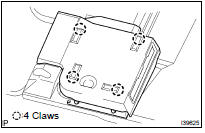
(a) Remove the 4 claws and the navigation ECU cover.
3. REMOVE NAVIGATION ECU W/BRACKET
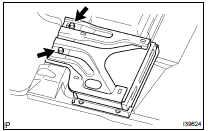
(a) Disconnect the connector.
(b) Remove the 2 bolts and the navigation ECU w/ bracket.
4. REMOVE DISC PLAYER BRACKET
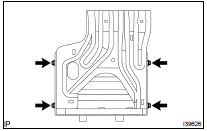
(a) Remove the 4 screws and the disc player bracket.
5. REMOVE NAVIGATION ECU
6. INSTALL NAVIGATION ECU
HINT: Perform the screen noise automatic adjustment when screen noise occurs (see page 05-1803 ).
7. INSTALL FRONT SEAT ASSEMBLY LH POWER SEAT (SEE PAGE 72-1 1) MANUAL SEAT (SEE PAGE 72-19 )
Was this page helpful?