Audio & visual system
Video(video adapter) terminal
In this manual: Audio & visual system
~1min read
REPLACEMENT
HINT:
- COMPONENTS: See page 67-2
- Installation is in the reverse order of removal.
1. REMOVE VIDEO(VIDEO ADAPTER) TERMINAL
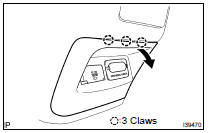
(a) Remove the video (video adapter) terminal together with the console box rear cover as shown in the illustration.
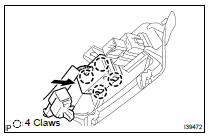
(b) Disconnect the connector.
(c) Release the 4 claw fittings and remove the video (video adapter) terminal.
Was this page helpful?