Audio & visual system
Television display ASSY
In this manual: Audio & visual system
~1min read
REPLACEMENT
HINT:
- COMPONENTS: See page 67-2
- Installation is in the reverse order of removal.
1. REMOVE TELEVISION BASE
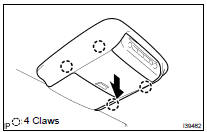
(a) Release the 4 claws and remove the television base.
2. REMOVE TELEVISION DISPLAY ASSY

(a) Disconnect the connector and remove the 4 nuts and the television display assy.
Was this page helpful?