Operating a bluetooth® enabled portable player
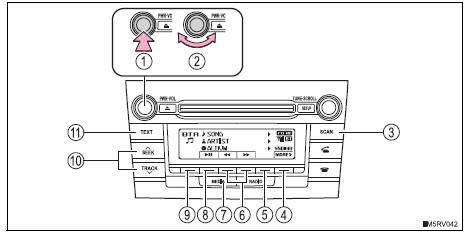
- Power
- Volume
- Search playback
- Next commands, random play or back button
- Repeat play
- Fast-forwarding, rewinding or selecting an album
- Changing the audio source/ playback
- Playback/pause
- Previous commands
- Selecting a track
- Displaying text message
Press  (<folder)
or  (folder>)
to select desired album.
Press  (more>)
to display the commands.
- Press and hold the “scan” button until you hear a beep.
The first 10 seconds of the first track in each album will be played.
To cancel, press the button again.Press 
or  on
the ¢§seek/track¢¸ button to select the desired track.
- Press the “scan” button.
The first 10 seconds of each track will be played.
To cancel, press the button again.Press  (
 ) or
 (
 ).
Press 
(<back) to display the commands.
Pressing  (rpt)
changes modes in the following order: track repeat 
album repeat 
off.
Press 
(more>) to display the command.
Pressing  (rdm)
changes modes in the following order: album random 
all track random 
off.
Press 
(more>) to display the command.
Press  (
 ).
Press  (<back)
to display the command.
Press the “text” button to display or hide the album title.
If there are continuing texts,  is displayed.
Press and hold the button to display the remaining texts.
Bluetooth® audio system functionsDepending on the portable player that is connected to the system, certain functions may not be available.
DisplayTest yourself
A quick Toyota RAV4 quiz: every answer comes with an explanation and a link to the manual page.