Using the bluetooth® audio/phone
- Bluetooth® connection condition
If “bt” is not displayed, the bluetooth® audio/phone cannot be used. 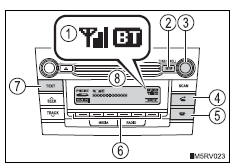
- Displays set up menu
- Selects items such as menu and number
Turn: selects an item
Press: inputs the selected item
- Off-hook switch
Turns the hands-free system on/starts a call
- On-hook switch
Turns the hands-free system off/ends a call/refuses a call
- Selects speed dials
- Displays information that is too long to be displayed at one time on the display (press and hold)
- Display
A message, name, number, etc. Is displayed.
Lower-case characters and special characters cannot be displayed.
Steering wheel switches (bluetooth® audio) Steering wheel switches (bluetooth® phone)- Volume
The voice guidance volume cannot be adjusted using this button. 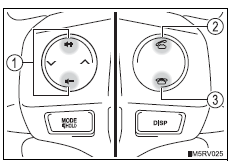
- Off-hook switch
Turns the hands-free system on/start a call
- On-hook switch
Turns the hands-free system off/ends a call/refuse a call
Microphone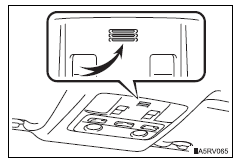
Using the bluetooth® audio/phone for the first time
Before using the bluetooth® audio/phone, it is necessary to register a bluetooth® device in the system. Follow the procedure below to register (pair) a device:
- Press the “setup” button and select “bluetooth*” using the “tune•scroll” knob.
- Press the knob and select “bt pairing” using the knob.
A passkey will be displayed.
If a bluetooth® device has both music player and cellular phone functions, both functions will be registered at the same time. When deleting the device, both functions will be deleted at the same time.
If the off-hook switch is pressed and the “phone” mode is entered when no phones have been registered, the registration screen will be automatically displayed.
*: Bluetooth is a registered trademark of bluetooth sig, inc.
Menu list of the bluetooth® audio/phone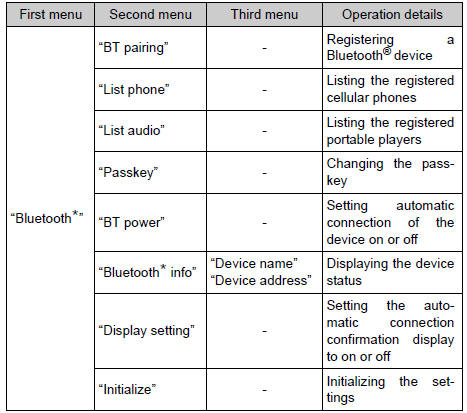
*: Bluetooth is a registered trademark of bluetooth sig, inc.
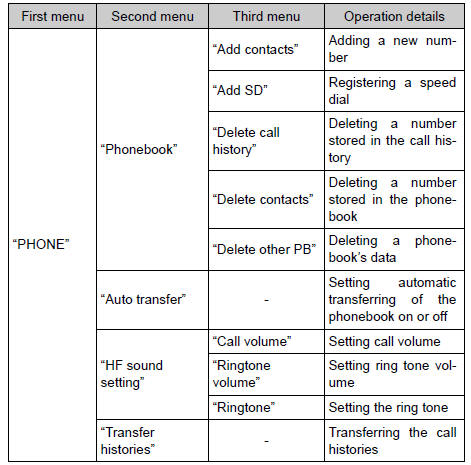
Bluetooth® audio/phone system functions
Depending on the bluetooth® device, certain functions may not be available.
Test yourself
A quick Toyota RAV4 quiz: every answer comes with an explanation and a link to the manual page.