Interior features
Optimal use of the audio system
In this manual: Interior features
6steps
~36min
2/5difficulty
Done 0 of 6
- Displays the “setup” menu
- Changes the following settings
- Sound quality and volume balance
The sound quality and balance setting can be changed to produce the best sound.
- Automatic sound levelizer
- Language
- Selecting the mode
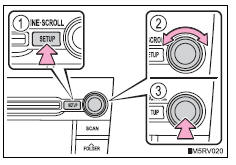
Using the audio control function Changing sound quality modes
- Press the “setup” button.
- Turn the “tune•scroll” knob to select “sound setting”.
- Press the knob.
- Turn the knob as corresponds to the desired mode.
Turning the “tune•scroll” knob adjusts the level.
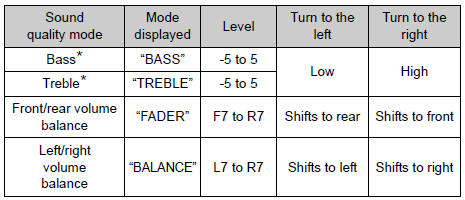
*: The sound quality level is adjusted individually in each audio mode.
Press the knob or 
(save) to return to the sound setting menu.
When asl is selected, turn the “tune•scroll” knob to change the amount of asl.
“Low”, “mid”, “high”, or “off” can be selected.
Asl automatically adjusts the volume and tone quality according to vehicle speed.
Press the knob or 
(save) to return to the sound setting menu.
Test yourself
A quick Toyota RAV4 quiz: every answer comes with an explanation and a link to the manual page.
Was this page helpful?