Using the cd player
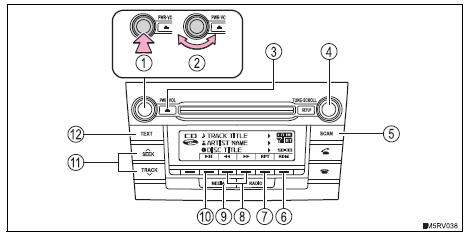
- Power
- Volume
- Cd eject
- Selecting a track or displaying track list
- Searching playback
- Random play or back button
- Repeat play
- Fast-forwarding or rewinding
- Changing the audio source/ playback
- Playback/pause
- Selecting a track
- Displaying text message
Insert a cd.
Ejecting cdsPress and remove the cd.
Selecting a track
Turn the knob or press
 to move up or
 to
move down using the  button until the
desired track number is displayed.
- Press the “tune•scroll” knob.
The track list will be displayed.
 (back).
Scanning tracks
- Press the “scan” button.
The first 10 seconds of each track will be played.
To cancel, press the button again.Press 
Random play
Press  (rdm).
To cancel, press 
(rdm) again.
Press  (rpt).
To cancel, press (rpt) again.
Playing and pausing tracks
Press 
Switching the display
Press the “text” button to display or hide the cd title.
If there are continuing texts,  is displayed.
Press and hold the button to display the remaining texts.
DisplayDepending on the contents recorded, the characters may not be displayed properly or may not be displayed at all.
Error messages“Error”: this indicates a problem either in the cd or inside the player.
“Cd check”: the cd may be dirty, damaged or inserted upside-down.
“Wait”: operation has stopped due to a high temperature inside the player. Wait for a while and then press the “media” button. If the cd still cannot be played back, contact your toyota dealer.
Discs that can be usedDiscs with the marks shown below can be used.
Playback may not be possible depending on recording format or disc features, or due to scratches, dirt or deterioration.
 Cds with copy-protect
features may not play correctly.
To protect the internal components, playback is automatically stopped when a problem is detected while the cd player is being used.
If a cd is left inside the cd player or in the ejected position for extended periodsThe cd may be damaged and may not play properly.
Lens cleanersDo not use lens cleaners. Doing so may damage the cd player.
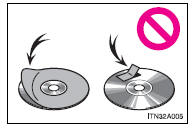
Notice Cds and adapters that cannot be usedDo not use the following types of cds.
Also, do not use 3 in. (8 Cm) cd adapters, dualdiscs or printable discs.
Doing so may damage the player and/or the cd insert/eject function.
- Cds that have a diameter that is not 4.7 In. (12 Cm)
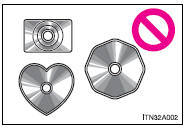
- Low-quality and deformed cds
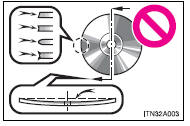
- Cds with a transparent or translucent recording area
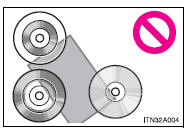
- Cds that have tape, stickers or cd-r labels attached to them, or that have had the label peeled off
Failure to follow the precautions below may result in serious damage to the cds or the player itself.
- Do not insert anything other than cds into the cd slot.
- Do not apply oil to the cd player.
- Store cds away from direct sunlight.
- Never try to disassemble any part of the cd player.
Test yourself
A quick Toyota RAV4 quiz: every answer comes with an explanation and a link to the manual page.