Interior features
Using the radio
In this manual: Interior features
10steps
~60min
3/5difficulty
Done 0 of 10
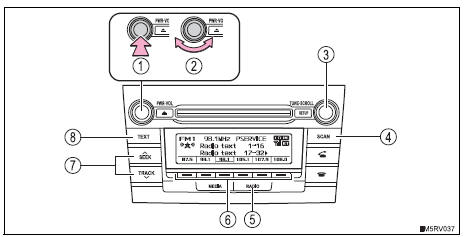
- Power
- Volume
- Adjusting the frequency
- Scanning for receivable stations
- Am/fm mode button
- Station selectors
- Seeking the frequency
- Displaying text message
- Search for the desired stations by turning the ¢§tune¢escroll¢¸ knob or pressing
 on the ¢§seek/track¢¸ button.
- Press and hold one of
 the station is to
be set to until you hear a beep.
- Press and hold the “scan” button until you hear a beep.
Preset stations will be played for 5 seconds each.
To cancel, press the button again.
- When the desired station is reached, press the button again.
- Press the “scan” button.
All the stations with reception will be played for 5 seconds each.
To cancel, press the button again.
- When the desired station is reached, press the button again.
Press the “text” button to display or hide the radio texts.
If there are continuing texts,  is displayed.
Press the button to display the remaining texts.
When the battery is disconnectedStations presets are erased.
Reception sensitivity- Maintaining perfect radio reception at all times is difficult due to the continually changing position of the antenna, differences in signal strength and surrounding objects, such as trains, transmitters, etc.
- The radio antenna is mounted on the roof. The antenna can be removed from the base by turning it.
- The antenna will touch the ceiling of a garage.
- A cover will be put on the roof.
Test yourself
A quick Toyota RAV4 quiz: every answer comes with an explanation and a link to the manual page.
Was this page helpful?