Meter
Operating Light Control Rheostat does not Change Light Brightness
In this manual: Meter
7steps
~42min
2/5difficulty
Done 0 of 7
DESCRIPTION
The meter CPU receives signals for adjusting illumination on the meter from this circuit. The meter CPU detects the illumination level selected by the user according to the position of the rheostat knob.
WIRING DIAGRAM
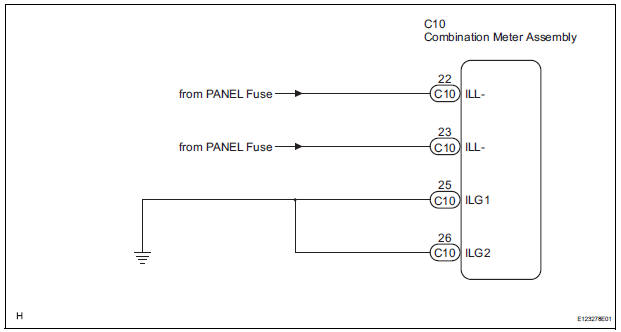
INSPECTION PROCEDURE
1 READ VALUE OF INTELLIGENT TESTER (LIGHT RHEOSTAT)
- Connect the intelligent tester to the DLC3.
- Turn the switch to the ON position.
- Turn the tester ON.
- Enter the following menus: DIAGNOSIS / OBD/MOBD / METER / DATA LIST.
- Check the values by referring to the table below.
METER:

OK: Light brightness displayed on the tester is almost the same as the actual light brightness.
REPLACE COMBINATION METER ASSEMBLY
2 CHECK HARNESS AND CONNECTOR (LIGHT CONTROL RHEOSTAT CIRCUIT)
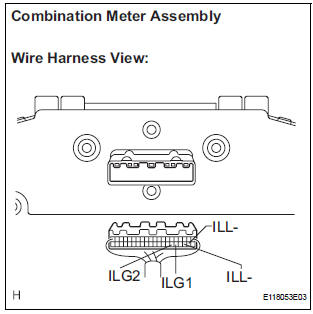
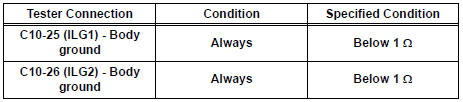
- Disconnect the C10 connectors.
- Measure the resistance according to the value(s) in the table below.
Standard resistance
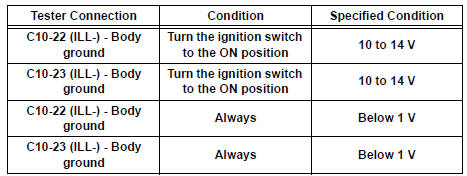
- Measure the voltage according to the value(s) in the table below.
Standard voltage
REPLACE COMBINATION METER ASSEMBLY
Test yourself
A quick Toyota Sienna quiz: every answer comes with an explanation and a link to the manual page.
Was this page helpful?